













2595✽
Hi Cuties, does anyone have the Embrilliance Thumbnailer? Is it worth getting? It appears to be just what I need. Also if it is any good,can I get it here in South Frica and where? regards to all
Comments (14)

44905✽
by
dlonnahawkins
08 Aug 2011
+4✽
Sorry, can't help. I don't know what that is. Guess I go look it up. Maybe another Cute member will come along and help.
1 comment
thanks anyway

7969✽
by
eastwitch2
08 Aug 2011
+5✽
The Thumbnailer program is very much like Embird Iconizer.
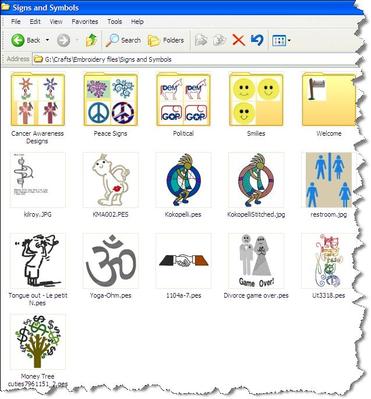
It allows you to see your embroidery designs in picture form in Windows Explorer on a Windows computer or on a Mac computer instead of just seeing the file names.
It is made to run on any Windows Operating System or on the Mac Operating Systems.
Your best bet is to buy it online - you can download the program or purchase the CD with the program on it.
Here is a link to view more information and you could purchase it from this link using the Store Tab at the top of the page.
This link is to the website of the developers of the program.
They also have other programs there too.
Hope this helps you!
EastWitch2
It allows you to see your embroidery designs in picture form in Windows Explorer on a Windows computer or on a Mac computer instead of just seeing the file names.
It is made to run on any Windows Operating System or on the Mac Operating Systems.
Your best bet is to buy it online - you can download the program or purchase the CD with the program on it.
Here is a link to view more information and you could purchase it from this link using the Store Tab at the top of the page.
This link is to the website of the developers of the program.
They also have other programs there too.
Hope this helps you!
EastWitch2
1 links:
[1]
http://embrilliance.com/products/embrilliance-thumbnailer
embrilliance.com
1 comment
thank you

7056✽
I for one love it . I can open my design file and there are your designs . IF your folders arent zipped . That is the only rub. But it is very handy when you want to find a design quickly . I got mine from the designs in machine embroidery site . Via ground mail .
www.dzgns.com
www.dzgns.com
1 comment
thank you
9754✽
I have it and also love it.... I bought it online as well. As long as your designs are not in .zip files, you can see a thumbnail of them (just like you can see a jpg thumbnail in Windows).
Now... what I'd really like is a program that allows me to set and find designs with tags AND shows me a thumbnail of the file.
Sharon
Now... what I'd really like is a program that allows me to set and find designs with tags AND shows me a thumbnail of the file.
Sharon
1 comment
thank you

360672✽
CAN SOMEONE EXPLAIN IT IN AS FEW WORDS AS POSSIBLE???Do i have it right in my head??This lets you SEE the picture /design before you open it??How much does this cost??Is there a free one or one to try?? thanks carolyn
3 comments

Yes, it turns your icons into images of the design.
I used SewIconz which is a stand alone program that does this, inexpensive, and brilliant support. I
f you have embird, iconizer is an addon that does the same, but you need embird basic first.
Clear as mud?
I used SewIconz which is a stand alone program that does this, inexpensive, and brilliant support. I
f you have embird, iconizer is an addon that does the same, but you need embird basic first.
Clear as mud?
thank you
well yes thanks:):)

38558✽
by
blueeyedblonde
08 Aug 2011
+2✽
my editor shows all your designs - it's free you could always try it and see how you like it. It won't show you a file that is zipped, but I have 7zip (also free) and use that you unzip files and then I can see them.
1 comment
thank you

32948✽
by
jofrog2000
09 Aug 2011
+4✽
Check out sewiconz which shows an icon of each file.
2 links:
[1]
http://sandscomputing.com/id18.html
sandscomputing.com
[2]
http://www.stitchesinmotion.ca/sewiconz.asp
www.stitchesinmotion.ca
4 comments

I have sewiconz and love it.
I'll agree, and the sands computing people give brilliant after sales support too.
thank you

I don't know how much Embrilliance is, but I think SewIconz is about $30. M

46919✽
6339✽
by
elizabethak
09 Aug 2011
0✽
Don't quite understand? My Bernina does that anyway so thought all machines do that on my laptop as my 440 is drived by the laptop)
Elizabeth
Elizabeth

9459✽
If you have a Mac computer Embrilliance thumbnailer is excellent
9754✽
I thought that I would add this... This is a screen shot of my Windows explorer Thumbnails with Embrilliance Thumbnailer (in Win XP... this works as well in Win 7, just a little different look). As you can see... you can see what the designs are without opening any of your files... Even inside folders. I love this tool!
1 comment
This is what SewIconz looks like, too, these little programs are great for a quick look! M

255066✽
I downloaded Thumbnailer this morning. I do realise that it has to be paid for but there is no price shown. I have written to the powers that be but so far have had no response. Strange that one can DL something before payment has been made.......
2 comments
were was that???carolyn
there was one you can try for a week??
7969✽
by
eastwitch2
09 Aug 2011
0✽
Here are 2 links for paying for the Thumbnailer program.
Second link shows that you add it to your cart and then I assume you go and pay! LOL
You may have to set up an account to do this, not sure but you will figure it out.
EastWitch2
Second link shows that you add it to your cart and then I assume you go and pay! LOL
You may have to set up an account to do this, not sure but you will figure it out.
EastWitch2
2 links:
[1]
http://embrilliance.com/store/index.php?main_page=products_a...
embrilliance.com
[2]
http://embrilliance.com/store/index.php?main_page=product_in...
embrilliance.com
7969✽
by
eastwitch2
09 Aug 2011
+1✽
If you have a Mac Computer and need Conversion software for converting design formats you can get the Convert it Mac program and the Thumbnailer program all together.
this is only for Mac computers!
It is on another website.
You will find this at the following link.
EastWitch2
this is only for Mac computers!
It is on another website.
You will find this at the following link.
EastWitch2
1 links:
[1]
http://www.macemb.com/cim.html
www.macemb.com