











 3368✽
3368✽
Has anyone stitched out the lady bugs yet? All I did was take the design and add a ring to make a coaster. The design looks correct in the computer and on the machine but when it stitches the wings are in the wrong place. How do I fix this? (the black bodies just need legs and I can make them ants, lol)
3 images:
[1]

[2]

[3]

Comments (7)
 463498✽
I see your problem and I don't have an answer. I hope someone else will.
1 comment
If it looked wrong in the computer and machine I could understand it but it looks fine.....sigh.
Would have been cute.
Would have been cute.
 89895✽
It could be a lot of things. The particular format you are using. If you changed the size of the design. I'm clueless and other cuties should have an answer for you.
2 comments
I was careful not to change it because she said it would warp the design. I just wonder why it does not show it that way.
Had to down load in HUS then converted it to ART
 8431✽
8431✽
I haven't stitched them, but my machine has done that before. Sometimes I am sure it was the design, but other times it can be the machine. First I would try turning the machine off for a minute to re set everything, re load the design and try again.
2 comments
Thanks, almost have the red that I stitched pulled out so I can try again,lol
When you try again. Line up the color you need to do and check to see if it's in the right place before you go fast.
 37638✽
Since it looks okay in the computer screen my guess is the hoop got moved or something in the transmission went wacko. I would turn it off- both machine and the sofware and start the 2nd color and
see what happens. This has only happened to me when
I've removed the hoop to untangle a nest or something and tho careful it got out of alignment.
Tell us what happens
see what happens. This has only happened to me when
I've removed the hoop to untangle a nest or something and tho careful it got out of alignment.
Tell us what happens
3368✽
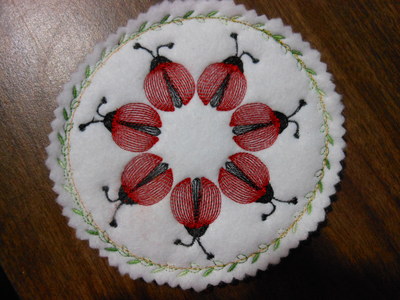
OK this is what I had to do. CAREFULLY picked out the very small stitches. I turned off the machine to reboot it. Reloaded the design and checked the first stitch. Had to adjust, I guess I must have hit the hoop or something. Got the first stitches close then skipped to the red wings and finished. It turned out OK despite everything. I am trying to make Christmas presents so I hope the next ones are better. Thank all who helped.
 3368✽
3368✽
OK this is what I had to do. CAREFULLY picked out the very small stitches. I turned off the machine to reboot it. Reloaded the design and checked the first stitch. Had to adjust, I guess I must have hit the hoop or something. Got the first stitches close then skipped to the red wings and finished. It turned out OK despite everything. I am trying to make Christmas presents so I hope the next ones are better. Thank all who helped.
4 comments
Sorry for double post. Think I am going to bed,lol
Very cute!
Turned out cute.

This bumping the machine happened also to me or I forgott that there is something to close behind the machine :o)
Very nice coaster and happy christmas stitching...
Greetings, Bettina
Very nice coaster and happy christmas stitching...
Greetings, Bettina
 16311✽
by
justonlyme
02 Nov 2011
+3✽
It seems as though you have the problem fixed. How cute your project has turned out to be!! I like your idea. I've needed to make some coasters as gifts, and I think that you've given me a great idea. Thank you for showing what you did (and shouldn't do). Don't ya just hate the bloopers?? It happens to everyone sooner or later; with me, it is always sooner. Good luck with the rest.