













17488✽
Good Morning Everyone! I had a great sale over the weekend. Now to get ready for the next one, I'm getting "POOPED" out!
I'm looking for instructions using Embird on how to do outlining on a design, and make redwork designs. I would really like to learn how to do this in my "spare time".
Thanks
Mary Ann
Comments (3)

145307✽
On an existing design, or one you digitised?
If it's one you digitised there are several methods.
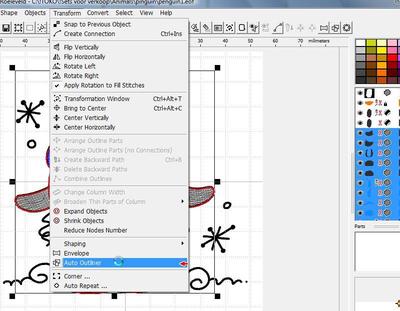
1. You can use auto-outliner in the transform menu, but that does not work when that gives double lines, like between the body and the wings.
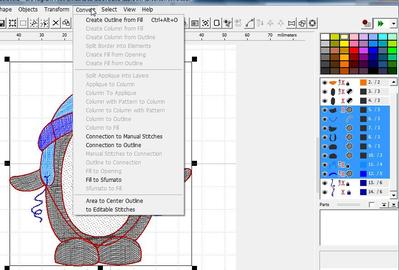
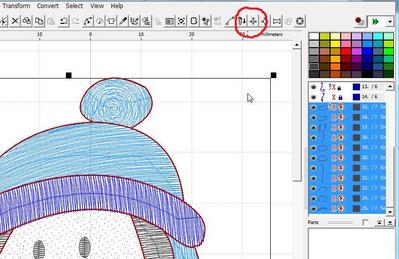
2. Use convert fill to outline (picture2)and delete the doubles from the various objects, then use the treelike icon to form one continuous line with backward path.(picture 3) If you want a satin stitch outline, set the parameters BEFORE using the 'tree' and it will automatically stitch a single stitch line and the backward path will be satin.
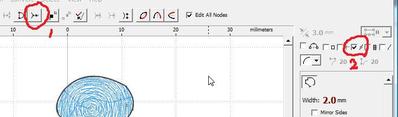
3. You can do it entirely by hand. Make as long a line as you can, making sure there's a square node at the cross point. Then digitise the remaining lines, making sure the nodes lie on top of the others at the cross points (method 1 or 2 in picture 4).
For redwork use method 3.
If it's one you digitised there are several methods.
1. You can use auto-outliner in the transform menu, but that does not work when that gives double lines, like between the body and the wings.
2. Use convert fill to outline (picture2)and delete the doubles from the various objects, then use the treelike icon to form one continuous line with backward path.(picture 3) If you want a satin stitch outline, set the parameters BEFORE using the 'tree' and it will automatically stitch a single stitch line and the backward path will be satin.
3. You can do it entirely by hand. Make as long a line as you can, making sure there's a square node at the cross point. Then digitise the remaining lines, making sure the nodes lie on top of the others at the cross points (method 1 or 2 in picture 4).
For redwork use method 3.
4 comments
Thanks to your question I made the outline to this design.
WOW!!! Thank you so much for doing this for me. I printed it out so I will have it in my files.
I did find a "Redwork Lesson" online last night and worked on it until 2:00am. People just don't understand how much time it can take to make a "simple" redwork design.
I wish I could give you a big "HUG" in person, you gals have helped me so much on here.
Thank you
((HUGS))
Mary Ann
I did find a "Redwork Lesson" online last night and worked on it until 2:00am. People just don't understand how much time it can take to make a "simple" redwork design.
I wish I could give you a big "HUG" in person, you gals have helped me so much on here.
Thank you
((HUGS))
Mary Ann
"simple" design. I wish I could give you a "BIG HUG" in person, you gals have been so helpful on here.
Thank you ((HUGS))
Mary Ann
Thank you ((HUGS))
Mary Ann
I wonder why my message got cut off again. I had to do it in two parts. Hummmm

132773✽
Mary Ann, Glad that Martine could be of help to you.
I'm so pleased to hear that you had great sales. Don't over do things now. Hugs Yvonne
I'm so pleased to hear that you had great sales. Don't over do things now. Hugs Yvonne
1 comment
Thank you Yvonne, You and everyone else has been so helpful on Cute, I'm sure glad that I found this site.
((Hugs))
Mary Ann
((Hugs))
Mary Ann

21543✽
by
susiesembroidery
15 Nov 2011
+4✽
I happy that you had a great sale over the weekend. I am now preparing for four weekends both Saturdays and Sundays. We are having these special markets over the Climate Change Talks and I hope to be doing well. Hope you can find out all the things you want to do with your Embird. I am new with Digitising and have Bernina V6. I enjoy it a lot and would like to start sharing my designs with Cuties in the near future. ***
1 comment
Thank you. I have been learning Embird and everyone on here has been very helpful answering my questions. It's so nice that I'm able to do a little digitizing just for my own needs. I have no intent on making and selling designs. I'm happy, and I love what I'm doing.
Mary Ann
Mary Ann