









 360672✽
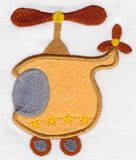
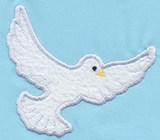
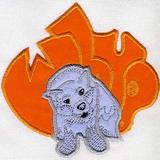
I WAS PLAYING IN 5D TODAY BOY I NEED A TEACHER :):)THIS IS ZAZMAUS DESIGN AND IT WAS ONLY LITTLE 4X2 SO I MADE IT 8.88 X 5.24 AND I INCREASED THE STITCH COUNT WHAT CAN I DO TO IMPROVE IT PLEASE???CARLOLYN
1 images:
[1]
Comments (8)
 72398✽
great work
1 comment
THANKS DEVON BUT I NEED TO LEARN MORE LOL
 119791✽
you have to take some class an digitizing i have the Floriane software and i now noting
1 comment
nowhere within 8 hours to take a course :(:(i live deep in the bush
 89895✽
Isn't it fun to play. The edge could use some more stitches. When you increased the size did your program increase the stitch count or can you do that manually? Like the neat shape of the design.
1 comment
It increased the stitch count to, i am putting it on a white t-shirt for myself i will show you shortly if i don;t wreck the whole thing lol
 37638✽
I don't have your software but as you know that is a large change and the edges have broken apart under
the strain not able to fill in- to bad because it looks nice in this size. I don't know if any program
can handle a change this large but I'm no expert.
Hugs
Linda aka Bumblebee
the strain not able to fill in- to bad because it looks nice in this size. I don't know if any program
can handle a change this large but I'm no expert.
Hugs
Linda aka Bumblebee
1 comment
yes i came to the same conclusion!!
 24342✽
Carolyn, you are so game you try all! I thought you couldn't increase in software more than 20% without problems. But I have never tried to increase more than that. some will come along to help I am sure. Hugs Sally
1 comment
Well i have gone more then that with other designs and it worked out but heck i don't know lol
 78119✽
When you use a ready-made embroidery, I have been told to not enlarge it more than 20%, but the result can be disappointing even at 20%. I have 4D Embroidery Extra and have "digitized" a few applique borders using the Wizard's help. When you have a good drawing (jpg format) with thick border, the program works well enough (at least for me, as embroidery is a hobby for me). To learn more about your 5D, have you checked the tips given in Husqvarna's website? Also, in Secrets of Embroidery you can find help and lessons you can buy.
4 comments
nope checked nowhere i am not good at understanding all the reading ???but i will try there ok
Carolyn, I understand that Carolyn Keber (not sure about the spelling) provides videos as well.
Forgot to write that you can find Carolyn Keber in Secrets of Embroidery.
yes i saw that but there for sale @%0./??
 145309✽
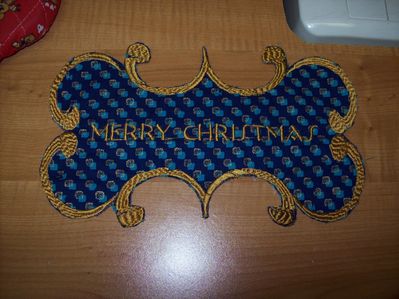
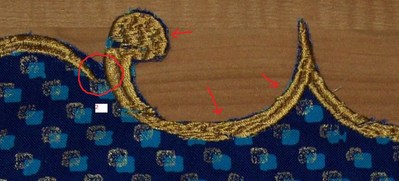
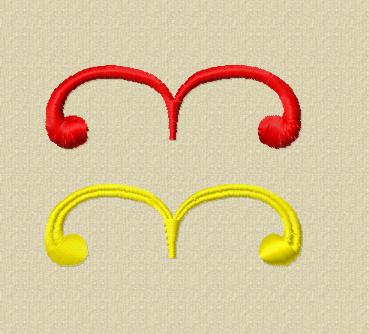
Carolyn, increasing more than 20% can be done, but it depends on the quality and the chosen stitch in the original. What I can see when I enlarge your picture is that the outline is probably a satin stitch that does not make a right angle with the line it is following, but stays more or less horizontal. As soon as a stitch gets larger than 12 mm it is automatically divided in 2 or more stitches (see the arrows in picture 1) so instead of a smooth line in varying thickness, you get the result you've got. Add to it that very small gaps that are not noticeable in the small size show up very noticeable in the enlarged size (see for instance the circle in picture).
I'm afraid the only thing to get good results is redigitising in the size you want it to be. That could for instance be as a satin stitch or as one with the dividing line in the middle (and I see I left a connection stitch showing) or whatever you would like best.
There are lots of video-tutorials on the Husqvarna website. Easiest way to get to them is from 5D - click 'Learning Center' and it takes you directly to them.
I'm afraid the only thing to get good results is redigitising in the size you want it to be. That could for instance be as a satin stitch or as one with the dividing line in the middle (and I see I left a connection stitch showing) or whatever you would like best.
There are lots of video-tutorials on the Husqvarna website. Easiest way to get to them is from 5D - click 'Learning Center' and it takes you directly to them.
3 comments
ok that helps my understanding a little better !!Thanks for your time hugs carolyn
i will try via 5d to Mops thanks again
Very good explanation-even I got it. LOL
Thanks
Martine
Thanks
Martine
 62461✽
I might also ask if you used the resize feature. Because that changes the stitch count. If you just enlarge it the stitch usually stays the same.