













7672✽
We discussed a while back about organizing our designs....just wanted to let you all know that I've started! I actually deleted a bunch of freebies that I know I will never use..... and put all my designs on memory sticks.
Now I'm in the process of putting pictures of all designs in an album.... easier for me to look at them. On each design paper I have noted where the design is stored and each one has a control number...
Now if I can just not fall back into taking every freebie I come across!
MJDG
Comments (21)

70767✽
great job.. I have been doing this all along and I have pictures in folders and I put all pictures in plastic sleeves.. I have forty folders and tons of designs and I am also deleting ones that are not really ones that I would ever use.. of course how many of these will I ever use..
3 comments
An easy way to save pictures if you have windows seven is to use the snipping toolto highlight then save them on your hard drive, cheaper, you don't neen to print or store them somewhere.

I like your idea as it is less work. I have Windows 7 but not sure where the snipping tool is?
thanks
thanks
The snipping tool is on the left hand side after you press start and your list of programs comes up.

64451✽
That is a big job but on my to do list for 2012. Want to come up with some kind of coding system that will help me keep track of where they come from,
hugs
Michelle
hugs
Michelle
2 comments

michelle i should have done this from the start but now just beore you hit the save button right clich on the file name adn rename the file by highlighting it and at he beguining of the file name put the first few letters of the company eg: emblib.and then a full stop then hit save and u should have something like emblib.s15764.pes or whatever format you use hope this is of some help...soozie
sorry ran out of space...and then a full stop then hit save and u should have something like emblib.s15460pes or whatever format u use hope this is of some help...soozie

211088✽

20276✽
I do that I put initials in front of the design..
so I know where the design came from.. I now have folders for each website so I can put the their design into their folder. but i do have a years worth of collected designs that i dont know where i got them from perhaps i could post an image and see if anybody reconizes these designs lol..
Big hugs from London
Maria xx
so I know where the design came from.. I now have folders for each website so I can put the their design into their folder. but i do have a years worth of collected designs that i dont know where i got them from perhaps i could post an image and see if anybody reconizes these designs lol..
Big hugs from London
Maria xx

23163✽
by
greysewist
04 Jan 2012
+10✽
Well done -what a good start to 2012 you've made. When I file as I go, I put things into categories and put the digitizer or initials at the end before the dot. That way I can find all 'cat' designs etc in the one place, without having to remember the digitizer's name.

10179✽

23222✽
That's great that you're getting started on this. Don't get discouraged and quit because you'll be happy in the long run. I'm glad I started organizing when I first started with embroidery but sometimes I still can't find what I'm looking for. LOL At least I have something.

33986✽
Once I tried to print out my designs but after filling a lever arch file I give it up. My files are in categories and for those webpages where I buy often I have an additional folder where I put a copy in (cute,emblibrary, UrbanThreads,sick, bunnycup...).
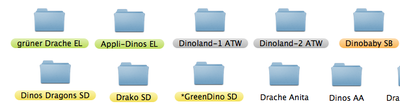
Like greysewist I took the initials of the website at the end of the filename before the dot. For my favs I use different colors as background.
My taste in the designs changed during the time since I started with embroidery and now I like some styles/designs that I would never had dl at the beginning ;o)
Greetings, Bettina
Like greysewist I took the initials of the website at the end of the filename before the dot. For my favs I use different colors as background.
My taste in the designs changed during the time since I started with embroidery and now I like some styles/designs that I would never had dl at the beginning ;o)
Greetings, Bettina

38558✽
by
blueeyedblonde
04 Jan 2012
+4✽
I started out putting my designs in categories like animals and then a file for each type eg. monkey, lion, etc. When I started though nobody mentioned about finding a way to know where I got the design. I also have many designs I d/l that I haven't opened yet. I have all my designs on 2 separate external hard drives. When I started I was also printing out the picture of each design and laminated and bound them.
7672✽
All good suggestions.
I find that I do better printing a picture and keeping them in notebooks in plastic sleeves.
I have my designs stored on memory sticks that are all different colors. For instance for a rose design it will say Stick PK/PLD - folder Flowers (rose) and usually the site I got it from.... I have many that I do not know where I got them so they are just generic. LOL
I already have two VERY LARGE notebooks. I keep the purchased designs separate from the freebies, also.
Once I've looked through the notebooks (which are separated into catagories) and picked my design it is very easy to go to the correct memory stick and find the design to load onto my machine.
That's my way.....I am afraid to just store them on the PC as mine is older and I'm afraid I might lose all my designs if the PC dies.
MJDG
I find that I do better printing a picture and keeping them in notebooks in plastic sleeves.
I have my designs stored on memory sticks that are all different colors. For instance for a rose design it will say Stick PK/PLD - folder Flowers (rose) and usually the site I got it from.... I have many that I do not know where I got them so they are just generic. LOL
I already have two VERY LARGE notebooks. I keep the purchased designs separate from the freebies, also.
Once I've looked through the notebooks (which are separated into catagories) and picked my design it is very easy to go to the correct memory stick and find the design to load onto my machine.
That's my way.....I am afraid to just store them on the PC as mine is older and I'm afraid I might lose all my designs if the PC dies.
MJDG

20463✽

6030✽
I HAVE ALSO STARTED TO ORGANISE MY DESIGNS, HOPE I CAN GET THERE. DO IT THE WAY THAT YOU FEEL IS EASY TO FIND A DESIGN. HUGS

35675✽
Great! Keep at it. What ever works for you is the best way! One suggestion: back up on something besides the flash drive. I did have a flash drive fail & it had all my designs from sick! Probably didn't really need them all..but hated to lose them! You can put your back ups in a folder with the name as the color of the flash drive so if it fails, you can go pull it back up. But do remember to add to it as you add to the flashdrive! I put in my flashdrive back up & put anything new on the external drive & flashdrive at the same time.

8047✽

4766✽
Good job! I try to put a few of my designs (free & purchased) away each day I have the time. It is a job. But they are much easier to access and retrive that way.

29237✽
I'm a little confused by this thread. How in the world do you know where and what you have if you have no tool/program to view and organize designs? When I bought my machine, the dealer threw in a program called Designers Gallery Studio Plus. I don't know how I would do without it or something similar. I categorize my designs in folder in my computer and on one side of the program you can see the folder, like you would in Windows Explorer and then you can click a tab and see any categories you have made. ie: hearts, fsl, christmas, santa etc. I'm not understanding how others view their designs without something like this????
5 comments
On my folder side I have folders named A thru D and in that folder I have subfolders with designer/website names etc. I must have 100 folders or more, same on my category side..Christmas with subfolders of bells, lace, ornaments, santa etc.
And, on both sides, if you click a folder, pictures of all the designs show up on the right side of the screen, even if they are zipped.
Bowlds, I am sure she has some kind of software. However; she didn't mention it. There's no way she would be able to organize them if she didn't. I remember when I started I only had my PE-Basic that came with my machine. It helped me a lot but now that I have other programs I am more HAPPIER ;D *2U
Oh! Good, I couldn't figure it out!!
Thanks.
Thanks.
mad14t, what software do you use now?

2281✽
by
louisecockeran
08 Jan 2012
+1✽
Wow I wish it was me, I don't like to store on a memory stick because it can become corrupted and then all is lost I download and store in a "new design" folder and after that will file it in my permanent folders and after I done this I will make a hardcopy on a write able dvd and store it there so all my designs are always on my computer but also on a dvd for backup, If just I have the time to do this everyday but ....

63237✽
FIESTA...I started ealier last year deleting designs I couldn't use ;D *2U

255066✽
Well done - a good start to 2012. I very rarely DL freebies these days as I have enough to last me more than a lifetime. When I do I unzip straight away and file. I have also purchased SewIconz, which is a wonderful program for for looking at designs, number of stitches, size and colours.
1 comment

That's what I've got, after reading about it here.
7672✽
To answer the question posted as to software.. I downloaded a free embroidery folder from the internet....(My son in law did it and I have no idea how) I named it Brother's downloads just because that is the kind of machine I have.
I zip all my designs into that folder....designate a folder within for each group ( animals, flowers, etc.) then I put them on my mem. stick. I also put them on a DVD... just in case.
It may be the dumb way to do it but works for me~
MJDG
I zip all my designs into that folder....designate a folder within for each group ( animals, flowers, etc.) then I put them on my mem. stick. I also put them on a DVD... just in case.
It may be the dumb way to do it but works for me~
MJDG
29237✽
Does anyone use software that will let you categorize the designs? The one I use lets you keep the designs in folders named,ie Designers Name and then I can categorize each design into several categories. Like, one design may go under several categories ie: FSL, coffee and kitchen.