145309✽
Creating outlines (fancy stitches) in Embird.
Made a tutorial. It's a 7-page illustrated pdf-file. Anybody who's interested, send me a PM with your email address and I'll send it.
Comments (34)
 7419✽
7419✽
by
starlizard
18 Jan 2012
+13✽
Martine!
I'm thinking about Embird, but I've got a lot of questions. I've looked at their site, but its somewhat confusing to me. I'm running Windows7 on my computer and I got the impression that the newest version of Embird isn't compatible with it. Can you point me in the right direction?
Thanks,
Liz
I'm thinking about Embird, but I've got a lot of questions. I've looked at their site, but its somewhat confusing to me. I'm running Windows7 on my computer and I got the impression that the newest version of Embird isn't compatible with it. Can you point me in the right direction?
Thanks,
Liz
5 comments
From what I read Iconiser is the only part of the latet build (2010D) that gives problems with Windows 7, but I still use Vista so I can't tell from experience.
Thanks for responding so quickly. I suppose I could email them with my questions and computer specs just to see what they have to say.
I am using Windows 7 32-bit with Embird Iconizer and everything works fine; I think it is just the 64-bit that there were a few problems with. These may have been sorted with the last update.
Yes I am running Windows 64-bit and the latest Embird update sorted out the problems. Everything works fine now including iconizer.
Sue, thank you for letting us know that Embird has an update that has the Iconizer problem fixed. Hugs, Lidia
 31635✽
 96386✽
1996✽
96386✽
1996✽

 173695✽
I am going to try to get another 30 days of trial and yes I would love your tutorial! thank you christine cfidl@yahoo.com
1 comment
I don't think you'll getanother 30 days. Added you to the list.
 1066✽
1066✽
I'd send you a PM if I knew how ... I have Studio and am always learning new stuff it can do!!
my e-addy is liz92b AT gmail DOT com
my e-addy is liz92b AT gmail DOT com
3 comments
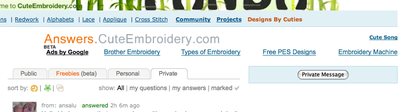
To send a PM go to the tabs at the top,
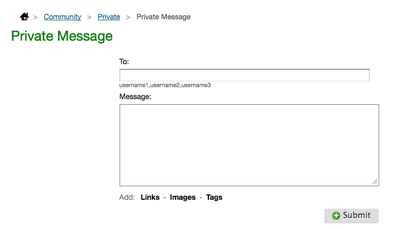
got to private, on right hit private message. Then, enter the persons cuties id
name IE mops, then type your message and send. That way you keep your info private
off the worldwide internet.
got to private, on right hit private message. Then, enter the persons cuties id
name IE mops, then type your message and send. That way you keep your info private
off the worldwide internet.
Added you to the list.
there isn't a tab called private ...
 140729✽
I'd like it please, Martine!
2 comments
I already added you to the list, I thought you would.
Thank you, my guru.
 20463✽
yes, please I would likt to try too,
thank you for the effort 7 pages is a lot of work
thank you for the effort 7 pages is a lot of work
1 comment
Added you to the list, I have your email address.
 360672✽
wOULD THIS HELP ME IN MY 5D HUSQVARNA PROGRAM ???HUGSCAROLYN
2 comments
No, it's specific to Embird.
But, according to the 5D Design Creator manual, you can design your own motif-lines and motif-fills there as well. I have, however, not tried that out sufficiently to give you directions other than a very summary remarks in the manual.
But, according to the 5D Design Creator manual, you can design your own motif-lines and motif-fills there as well. I have, however, not tried that out sufficiently to give you directions other than a very summary remarks in the manual.
in the manual.
 8431✽
8431✽
Thanks Martine that would be wonderful. I've sent you a PM.
I reckon if I could borrow you for a couple of days to sit beside me and talk me through things I would finally work Embird out!
I reckon if I could borrow you for a couple of days to sit beside me and talk me through things I would finally work Embird out!
 8073✽
8073✽
by
cathiejones
18 Jan 2012
+8✽
Oh yes please, I would love to create some fancy outline. This is very kind to share with us your tutorial, thank you. PM on its way !
 1029✽
1029✽
by
littleklothz
18 Jan 2012
+8✽
Can I please have a look at this too? Thank you
1 comment
Just let me know your email address in a Private Messaage and I'll send it to you too.
78119✽
Every now and then I'm thinking of buying Studio to be able to digitize the shapes I like, not to become a digitizer, I'm too old for that. I would like to read the instructions first and this is a wonderful opportunity. I will send you a PM, Martine. Thank you.
2 comments
Why too old?? The tutorial is not meant as instructions for a beginner, but showing how to make a fancy stitch outline to be used just like the choices for outlines that Embird offers. Sue made a sampler of the latter, I show how to make others. But the tutorial is on its way to you.
Martine, I meant to say that I don't want to become a professional digitizer, just to learn to do a few things. I will also read Embird's instructions, as I have downloaded their instructions file (about 34 MB or so). Thank you, hugs, Lidia
269✽
Hi I would love to look at it also. I will pm you. I have Embird and am thinking of getting studio soon. Thank you
 11473✽
 39739✽
 19452✽
OH thanks so much! I will send you a pm too! Bug hugs for your kind work and gift!!
1128✽
by
anothrcookiejar
19 Jan 2012
+4✽
Sending you a pm! Thank you so much for taking your time to do this! Hugzzz, Linda
 2847✽
2847✽
I tried to send Pm did not work. Please can U send me those Files would love to try. Love Cica Mail cicadamn@yahoo.com
1 comment
Done.
 6241✽
6241✽
Can you please send me the illustrated pdf-file. Sorry don't know how to send PM My e-mail address is benzcollette@yahoo.com Thanks you very much
Love Brenda
Love Brenda
2109✽
I have had a play with this function but I am not very happy with the results. I would be grateful to have a look at someone else's perspective on this. I will PM you with my email address. Many thank Suet
2 comments
Had just sent it to a long list, but forwarded it to you as well.
When you play with the function remember the scale. When you set the width at 5 or 10 mm, you can easily see what size the individual stitches are going to be. Make sure they are not too short, that would give unsatisfactory results when stitched out.
When you play with the function remember the scale. When you set the width at 5 or 10 mm, you can easily see what size the individual stitches are going to be. Make sure they are not too short, that would give unsatisfactory results when stitched out.
too short (a single one would not matter, but the majority must have a reasonable length) that would give unsatisfactory results.
145309✽
Sent it to another 23 Cuties. I'm glad I can now get back to sewing and embroidering!
1181✽
6241✽
Thank you so much for the 7 page illustration You are so kind
Love Brenda
Love Brenda
 743381✽
sorry this is for embird, I don't have that program. but great you can help others.
 70777✽
I got mine, Martine, thanks so much for all your hard work in putting this together and getting it out to all who wanted it. I need to set a side a big chunk of "quiet time" to work on this. Hugs, *'s, and thanks again, Deb
2555✽
by
mjjust2ofus
23 Jan 2012
+2✽
Please send me the tutorial.
mjjust2ofus@yahoo.com
Hugs,
mj
mjjust2ofus@yahoo.com
Hugs,
mj
842✽
 17488✽
Thank you so much for all the help you have given me, and now this tutorial. You are just to kind.
Thank you
MAry Ann
Thank you
MAry Ann
 5347✽
5347✽
Thank you so much for sending the tutorial, it looks great! Now to find the uninterrupted time to play with it. Three grand kids under five in the house is not conducive to digitizing LOL.
 7528✽
140729✽
7528✽
140729✽
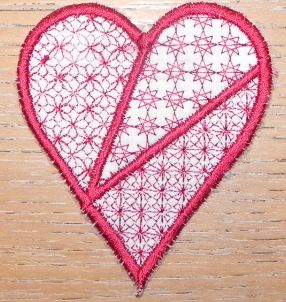
I've been playing with fancy fill stitches and have uploaded this design to DBC. My machine has been in the shop for a few days and I have a huge backlog of designs waiting to be tested!
3 comments
Great job, Sue!
This looks very pretty. I hope you'll have your machine back soon so you can test, but I see you spent a lot of time having fun!
I got it back today - but I have to work tomorrow.
 10494✽
I'm not sure how to send you a PM, But I would like your tutorials. I understand you have done quite a few. If you could PM me then I can get to you. I don't see a button that lets me do pms. Thanks
2 comments
twee you will find the private-tab at the right beside PUBLIC/Freebies/Personal and there it is: Private = PM-tab. Click on it and then at the right the button "Private Message". Now you can start :o)
Greetings, Bettina
Greetings, Bettina
Thanks, that is simple enough.
 33986✽
For all that don't know how to send a PM (please don't put your private mail-adress anywhere in the internet):
There are tabs over the post in community and the last in the row is PRIVATE. Click on this and there is a button at the right side "Private Message". Click and it opens a formular. Put in the name of the acceptor (the name always with small letters!) and your message. Click on SUBMIT and its on the way :o)
Greetings, Bettina
PS: Sorry mops to put this here in your post but that is asked so often and not just from newbies ;-)
There are tabs over the post in community and the last in the row is PRIVATE. Click on this and there is a button at the right side "Private Message". Click and it opens a formular. Put in the name of the acceptor (the name always with small letters!) and your message. Click on SUBMIT and its on the way :o)
Greetings, Bettina
PS: Sorry mops to put this here in your post but that is asked so often and not just from newbies ;-)