












 145309✽
I just sent the tutorial to 28 recipients. I hope I did not miss anyone, but if you don't get it, please PM me again. And the same applies to those who forgot to give me an email address.
Comments (26)
 78119✽
I have received your tutorial in pdf format. Thank you very much, Martine. I haven't read it yet but I will do it tomorrow morning (here is night). Thank you again, hugs, Lidia
 7199✽
7199✽
 39739✽
 37638✽
Thank You. Downloaded and briefly looked at to make sure file downloaded ok. Looks good.
7199✽
Just looked through the tut. The time & effort you have put in is amazing. Unfortunatly, I give up already. This is soo over my head, I'll just sit back and let you clever girls play. Thank you and good luck to all. xx
 140729✽
 11473✽
Thank you Martine. I received mine and it looks great.
Cindy B.I know how much work goes into creating a tutorial since I have done many over the last 20 years for adult computer classes I have taught.
Blessings and hugs.
Cindy B
Cindy B.I know how much work goes into creating a tutorial since I have done many over the last 20 years for adult computer classes I have taught.
Blessings and hugs.
Cindy B
1 comment
Thanks.
I knew what I intended to do and made screen prints as I went along, so it did not take too much time to add text to those pictures. Copying and pasting all those email adresses took much more time.
I knew what I intended to do and made screen prints as I went along, so it did not take too much time to add text to those pictures. Copying and pasting all those email adresses took much more time.
 64451✽
I would love to receive this Helen, thanks for doing this to help those of us who are learning,
I have sent you my address,
Thanks
Michelle
I have sent you my address,
Thanks
Michelle
1 comment
I put you on the list,
Martine
Martine
 173695✽
Thank you Martine! I will be learning today between stitching and thread changing! christine
 70777✽
I'd love to be on your list, Martine, if it's still possible. I'll pm my email Thanks! Deb
 25745✽
 5762✽
5762✽
 29237✽
 22354✽
by
sewfrenzie
19 Jan 2012
+4✽
I think I missed something this hectic week. What is the tutorial for?
1 comment
It is how to create your own fancy line to be used in Embird as one of the choices for an outline.
 20463✽
received and cherrished, will have a deep look tomorrow on the run for the rest of the day today - agree with all the work and the effort - Thanks!
 5347✽
5347✽
 96386✽
by
dailylaundry
19 Jan 2012
+4✽
I received mine - I am soooo impressed with how it looks and how it is written. I know it took time and trouble for you to do for us. But, please know that it is truly appreciated by me and all those who received it. Thanks bunches for sharing your time and talents with us!! Laura*
1 comment
My pleasure!
 26714✽
would you be kind enough to include me, i just read this post. thank you
58029✽
Martine, can you pu me on your list too please, I will send you a PM wit my e-mail adress. Thank you very much in advance. Carla
 24342✽
Hi Marine, I received mine just haven't time at the moment to play with it! But will get there! Thanks again. Hugs Sally
3 comments
Sorry that should be Martine no Marine!
Sorry that should be Martine no Marine!
and now hit submit twice - is monday morning LOL
 3368✽
3368✽
 19452✽
I have mine and thanks you so much! I have been caring for a sick kitty, and when I have more time...I am going to begin the process of learning!! THANKS SO MUCH!!
1149✽
Is this an Embird tutorial? <perk> I know how to answer a PM, but have no clue how to generate one.
 30988✽
I am trying to find out how to send you a pm.I saved a document on HOW TO, it says click on your name to go to home page, but it will not work,What am I doing wrong, Please help.
Hugs Pam.
Hugs Pam.
145309✽
An answer to several questions.
The tutorial is an advanced lesson for Embird users. I presume you know how to use the 3 basic tools, especially the outline tool, and how to use parameters. I explain how to add your own 'fancy outlines' to the sample-category.
I sent out 78 tuts until 1st of Febr. If you are interested PM me before this weekend, I'll email on Saturday and won't do later requests - a bit harsh maybe, sorry, but it has already taken up far more time than I expected.
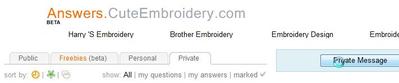
You can send a PM by clicking on the Private tab, then click Private Message - see picture. Type mops in lower case.
The tutorial is an advanced lesson for Embird users. I presume you know how to use the 3 basic tools, especially the outline tool, and how to use parameters. I explain how to add your own 'fancy outlines' to the sample-category.
I sent out 78 tuts until 1st of Febr. If you are interested PM me before this weekend, I'll email on Saturday and won't do later requests - a bit harsh maybe, sorry, but it has already taken up far more time than I expected.
You can send a PM by clicking on the Private tab, then click Private Message - see picture. Type mops in lower case.
 32767✽
that is wonderful of you Ricky I have the brothers digitizing program and i don't know how to use it I wish I had not let the sales guy talk me in to buying it It was so high I have never got it to work
Lenamae
Lenamae
1 comment
You should really give it try, many people love the program and I'm sure ther are free instruction videos on the internet.
Martine
Martine