













148939✽
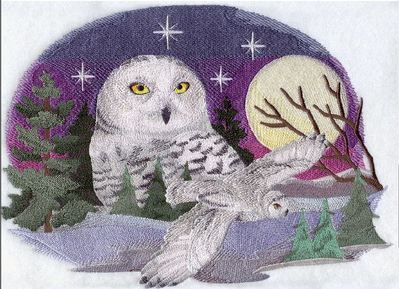
Help needed: I have bought this owl design from emblib. But as a beginner didn't notice the size. I have a Innovis 1500D and max is 26x16 cm. This design is 30x22. I managed to get it to correct size. But now It seems that my machine can not handle the 22 colors or color change of 47. So I thought I save it as .dst. the size of the design is less. I can now upload it to the machine. But it still complance that it can not handle this desgin. Help needed. Would like to sew this for my sweet sister-in-law's birthday
1 images:
[1]
Comments (15)

158720✽
Send them an email. They are usually quite nice about exchanges. Go onto your information page and be sure and put what kind of machine you have and it warns you that you are trying to order a design that your machine can't sew. ;)
4 comments
thanks. I didn't know you could do that ! I'll send them an email right away

I agree . Those people are very nice about doing that.
I have made that when i register there and this is very helpful. Sometimes I order bigger designs on purpose and you still can do this (p.e. a medley to split it in embird like the russian matroschka-triplet).
Greetings, Bettina
Greetings, Bettina
I have checked it; it was on 26x16 but inch was selected instead of MM :-(

255066✽
The design is beautiful - sorry I cannot help but I am sure there will be a Cute along shortly who can help with your problem.

57811✽
by
edithfarminer
21 Jan 2012
+8✽
What ashame as it is a beautiful design. Emb library designs are mostly quite stitch intensive to start with and it is reckoned that you can not make a design smaller more than 20% at the most.
I agree with jrob that it might be worth your while to e-mail tham and ask to change it to smaller. If not, a lesson learned to watch. Yes I am the same could not make this one in my machine either.
I agree with jrob that it might be worth your while to e-mail tham and ask to change it to smaller. If not, a lesson learned to watch. Yes I am the same could not make this one in my machine either.
1 comment
have send them and e-mail. Fingers crossed.

173695✽
Gorgeous! I hope I see the results in projects! Live Laugh Download Stitch!

743368✽
well I hope somebody can help. The design is gorgeous! I it possible to split the design perhaps?
hope there will be an answer that helps.
hope there will be an answer that helps.
3 comments
don't know how to do that ?
Once I was on a webpage who offers to split emblibrary-designs (they have the license from emblibrary). Cannot remember the name but sure somebody here will know or Deb from emblibrary can help you :o)
Greetings, Bettina
Greetings, Bettina

check on the help page on Embroidery Library. Click where it says "How can I split designs by size?"

33986✽
If just the number of colors is the problem it may help to split the design after the first half and save them as two designs. You can sticth them one after the other. Eventually you can outsmart your machine this way :o)
The other problem is the size and like the others said: These kind of designs is very dense. You bought the biggest of them. Hope they change it two numbers smaller (20,5x14,8cm). Or the size between but then you have still to reduce the size (it's 24,5x17,7cm).
Greetings, Bettina
The other problem is the size and like the others said: These kind of designs is very dense. You bought the biggest of them. Hope they change it two numbers smaller (20,5x14,8cm). Or the size between but then you have still to reduce the size (it's 24,5x17,7cm).
Greetings, Bettina
1 comment
thanks Bettina, My first option is to wait what emblib says/suggests.
743368✽
I use PE design. in Pe design kun je met behulp van het schaartje een bepaald gebied van het design selecteren. je kunt het daarna bijvoorbeeld knippen, stel je knipt de rechter helft. Van het restant de linker helft maak je dan een patroon dat je opslaat als deel A. Daarna open je het patroon nog een keer in zijn totaliteit je knipt nu de andere helft en slaat nu de rechter helft op als deel B patroon.
alleen als je gaat borduren in 2 keer moet je wel heel goed opletten dat de 2 delen A en B aansluiten op elkaar.en dat is een secuur werkje.
Ik vond ook wat links met informatie over het splitsen van designs. Ik weet niet of je er iets aan hebt.
En als je dit alemaal niet ziet zitten is inderdaad contact opnemen met de site een optie.veel succes
alleen als je gaat borduren in 2 keer moet je wel heel goed opletten dat de 2 delen A en B aansluiten op elkaar.en dat is een secuur werkje.
Ik vond ook wat links met informatie over het splitsen van designs. Ik weet niet of je er iets aan hebt.
En als je dit alemaal niet ziet zitten is inderdaad contact opnemen met de site een optie.veel succes
4 links:
[1]
http://blog.jennys-sewing-studio.com/?p=2025
blog.jennys-sewing-studio.com
[2]
http://www.youtube.com/watch?v=7fy9gtxcrq8
www.youtube.com
[4]
http://www.secretsof.com/wp/?p=943
www.secretsof.com
2 comments
sorry it was in Dutch: easier to explain this way.
ok bedankt, lijkt me inderdaad niet zo eenvoudig dat samenvoegen. Ik hou het als een optie. Eerst even afwachten wat Emblib zegt.
Alvast bedankt !
Alvast bedankt !

6340✽
by
marcellelewis
21 Jan 2012
+5✽
You received some excellent tips here. One more to think about. Look over your colors and see if there are any very similar colors that can be changed to the same color and still not detract from the beauty of the design. EmbLibrary uses a lot of colors to enhance the design but they can often be combined without losing the definition. Just something for you to consider. Good luck with it.
Beautiful scene. I considered buying that design myself. My son always liked snowy owls when he was growing up.
Marcelle
Beautiful scene. I considered buying that design myself. My son always liked snowy owls when he was growing up.
Marcelle
4 comments
how do you join colors ?
I don't join them I just use the same color when stitching a different part if it is very close and hard to tell ay difference in the shade.
In my Design Shop software I can join the colors by moving the segments to stitch one after the other but that is not always best to do.
Stitch order of the parts is very important in most cases so I don't change that if it is going to affect something nearby of something on top of it. Marcelle

11860✽
That is a beautiful design. I have several from Emb Library, and they are all very dense. Is there any way to decrease the density of a purchased design? Still a newbie.

24342✽
gorgeous design shame it is too big, but as I read below perhaps they will exhange...
532✽
by
jennlenore
22 Jan 2012
+3✽
I checked on emblibrary and it would seem that even their smallest is bigger than your hoop sizes can handle. What format does your lnnovis normally use? I know on my machine I have to use the correct format or one of two things happen. Either it won't run it at all or the color sequence is all out of whack!! I have an older Barudan and it will only run up to 75000 stitches without kicking it out of memory.Could this be the problem with this?Does your machine have a total stitch limit?

122866✽
I nearly purchased this myself but when I added it to my basket a message came up "that it was larger than my largest hoop size, did I wish to proceed?"
Naturally I didn't because I didn't want the hassle of splitting the design.
Now, because I didn't buy it, I cannot offer to split it for you unless I do go and purchase it. Oh all right you twisted my arm, I do have a gift voucher for 5 designs so I may as well clear my wish list.
I'll have a look at the stitch out once I purchase it. Hugs n roses, Meganne
Naturally I didn't because I didn't want the hassle of splitting the design.
Now, because I didn't buy it, I cannot offer to split it for you unless I do go and purchase it. Oh all right you twisted my arm, I do have a gift voucher for 5 designs so I may as well clear my wish list.
I'll have a look at the stitch out once I purchase it. Hugs n roses, Meganne
1 comment

Meganne, yo are sooooo sweet! It is beautiful!
148939✽
UPDATE : Emblib did send me a smaller design. Problem solved ? No 20.4x14.7 cm which should fit in my hoop.
However the filesize is 585 kb and I can only upload max 512 kb. So I saved the .PES as .DST and the file size went to 290 kb. (I had read that my bother accepts these formats too)
I could upload the design, but it I select it to sew it says
"Data format too big to sew". So it still does not want to start sewing it.
Any hints/ideas what I can try ?
However the filesize is 585 kb and I can only upload max 512 kb. So I saved the .PES as .DST and the file size went to 290 kb. (I had read that my bother accepts these formats too)
I could upload the design, but it I select it to sew it says
"Data format too big to sew". So it still does not want to start sewing it.
Any hints/ideas what I can try ?
1 comment
Contact them again, I'm sure they will work with you til it works!
115791✽
by
asterixsew
23 Jan 2012
+1✽
If you have softwear can you reduce it a little?
1 comment
size is ok now. It fits in my 26x16 cm hoop. So I'm thinking it has something to do with the amount of color changes : 47 or Color used : 22 ?

32948✽
by
jofrog2000
23 Jan 2012
+1✽
It's Murphy designs that has the split files, You have to check for yours, and there is a fee involved.
1 links:
[1]
split designs
www.murphysdesigns.bizland.com