












 1784✽
1784✽
Can someone either tell me how to create a straight line in embird - a nice stitched line and then I also need to know how to do a placement line.... Basically I'm trying to create a little holder for my friends photography CF cards. I just want to have a placement line so I can lay down rows of vinyl and then stitch them down and then lines going the other way to separate the vinyl into individual pouches.
I know this is simple and I have to be able to do it myself... Just cant figure out how to draw a straight line in Embird!!!
I'll finish it on my real machine because I want to add binding to it...
Please direct me :)
Comments (3)
 6340✽
6340✽
by
marcellelewis
21 Feb 2012
+2✽
I not going to try to tell you how to do that because I don't trust what I do yet in Embird. If you are just learning you should join one of the Yahoo groups that are dedicated to people learning Embird. There are a lot of people on all of them that are very good with the program and quite generous with their time to help new users.
Some of them are:
http://groups.yahoo.com/group/DigiStudio/?yguid=99909820
http://groups.yahoo.com/group/AbsolutelyEmbird/
http://groups.yahoo.com/group/Embird101/
http://groups.yahoo.com/group/Embird_Studio/?yguid=99909820
http://groups.yahoo.com/group/flyingneedle_studio/?yguid=99909820
Marcelle
Some of them are:
http://groups.yahoo.com/group/DigiStudio/?yguid=99909820
http://groups.yahoo.com/group/AbsolutelyEmbird/
http://groups.yahoo.com/group/Embird101/
http://groups.yahoo.com/group/Embird_Studio/?yguid=99909820
http://groups.yahoo.com/group/flyingneedle_studio/?yguid=99909820
Marcelle
2 comments
Thank you! I have resisted joining any yahoo group only because I already have about 6 emails that I have to keep up with... I guess I need to bite the bullet and make it 7 :) I can actually do other things I need to do on most occasions - I can even to appliques... just not straight lines! Go figure... On my way to find me a yahoo id...
If you are only going to join one you should probably join DigiStudio. It is excellent.
Marcelle
Marcelle
 145309✽
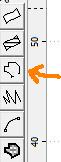
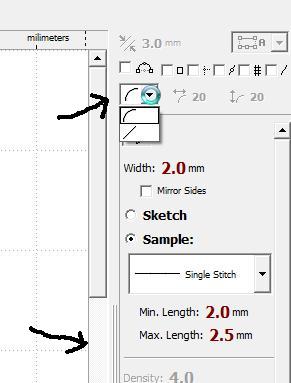
Have you read any of the tutorials? Digitizing a line is THE simplest thing there is, just click on the outline tool on the left of the screen in Studio, check on the right side of the screen if it's set to a straight line (choices are curve or straight) and set two points for the start and the finish. Done.
A placement line is no different from a stitched one, only thing you can change is the stitch length in parameters - set it to 3.5 or so, that prevents tearing of the stabilizer.
A placement line is no different from a stitched one, only thing you can change is the stitch length in parameters - set it to 3.5 or so, that prevents tearing of the stabilizer.
145309✽
Now that I'm working on my laptop instead of my iPad I can show you a few pictures.
Image1 shows the line tool, picture2 where to set it to a straight line and where to adjust the stitch length.
I really don't understand how you are able to do "other things" and not do a straight line.
Image1 shows the line tool, picture2 where to set it to a straight line and where to adjust the stitch length.
I really don't understand how you are able to do "other things" and not do a straight line.
1 comment
Thank you so much!! I have a huge tutorial I purchased and I never needed to know how to do a straight line. I just kind of skipped around and learned the parts I needed to for what I was doing... I'm trying to still work full time, homeschool and be a wife - oh and start my business and help my girlfriend promote hers so I'm doing a ton of graphics design work - and I just haven't stopped long enough to actually study the tutorial - mostly because I really haven't needed to learn to digitize yet or it just hasn't been important enough for me to take the time to completely learn how yet. But I find the particular tutorial I have is just overwhelming and next time I'll get something broken down into tiny bite size pieces. I actually have a graphics design tutorial that is purposely broken into 10-15 minute segments and I love it. I don't feel swamped. I can just watch/read each "piece" as many times as I need to until I get it and I don't have to filter through couple hundred pages of a book. I guess I just learn better that way.
I do plan to read the entire tutorial someday - I just have to set my mind that it really isn't overwhelming. I'm also going to subscribe to the yahoo groups and maybe that will better help me learn in small chunks like I need too.
Thank you for helping me get where I need to be at the moment :) My photography girlfriend will be so happy... I keep trying to do this on my real machine and I get frustrated because I know if I take the time to set it up on my embroidery machine - to replicate the pattern will take MUCH less time in the future :)
I do plan to read the entire tutorial someday - I just have to set my mind that it really isn't overwhelming. I'm also going to subscribe to the yahoo groups and maybe that will better help me learn in small chunks like I need too.
Thank you for helping me get where I need to be at the moment :) My photography girlfriend will be so happy... I keep trying to do this on my real machine and I get frustrated because I know if I take the time to set it up on my embroidery machine - to replicate the pattern will take MUCH less time in the future :)