













1165✽
Attention Digitizers! I'm begging for some advice/knowledge! I'm learning to digitize but can't figure out how to make 'overlapping' appliques. When one side of an applique will be overlapped by another applique, I don't want stitches under the overlapped area. Can this be done? I am using Embird and just can't find an answer....
Today's free design

A free embroidery design every day
Cute Embroidery gives away one design every day, and the community votes for tomorrow's.
Comments (4)

20463✽
not an expert but I guess you can not use the "auto" applique funktion and have to do it "by hand"
someone of the embird pros will know and you will have your answer soon
someone of the embird pros will know and you will have your answer soon
7875✽
Hi, I have P-E design Digi program.
It allows me to to digitize an "open path" (from one point to other and not a complete shape) on the under piece of applique.
I always remind some of our group to use the "help" button that most programs have across the top bar. Mine will show my complete manual, and you can query the exact thing you are stuck with while your program is on your screen. I use this help button in other programs too e.g. Word, Photo Shop and Printer. Look for your help button, it might be your best "teacher".
Hugs from Bev
It allows me to to digitize an "open path" (from one point to other and not a complete shape) on the under piece of applique.
I always remind some of our group to use the "help" button that most programs have across the top bar. Mine will show my complete manual, and you can query the exact thing you are stuck with while your program is on your screen. I use this help button in other programs too e.g. Word, Photo Shop and Printer. Look for your help button, it might be your best "teacher".
Hugs from Bev
2 comments
Bev I have PE-Design Next and I am just starting to try the applique function. I was doing closed paths. Are you saying I can do open paths and it will work just as well and not have to worry about overlapping stitches? Do you mean doing it manually or using the Auto Applique feature?
Thanks for any help!
Wanda
Thanks for any help!
Wanda
Also, is there a good way to applique without a ton of jump stitches?
21543✽
by
susiesembroidery
28 Feb 2012
+2✽
I do not have the same programme, but mine has a button that states that you can delete overlapping stitches - so easy with the Bernina V 6 software. I hope you find an answer. Enjoy your digitising. ****

145308✽
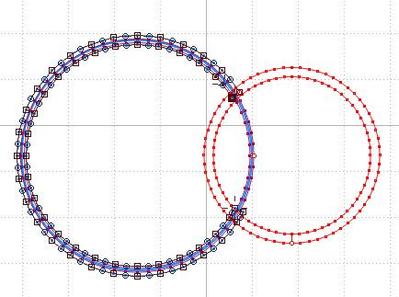
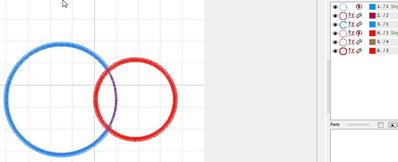
Did you use the automatic applique? I start with an outline mking sure the start point is under what will be the overlap, convert that to an applique and split the applique in layers. After that I remove the satin stitches only of the overlapped area
2 comments
Out of laziness I used two circles and did not follow the shape of the second one. This way you can also see better what I mean: complete the placement and attachment line and shorten the satin stitch line.
Thank you SO much mops!! You've made my day :) I was using automatic applique....didn't realize I could do the 'convert' thing, and didn't know about spliting in layers. I haven't found the tutorial/help for Embird very helpful and am learning by trial and (mostly) error! I appreciate you taking the time to help me out....THANKS again!