













255066✽
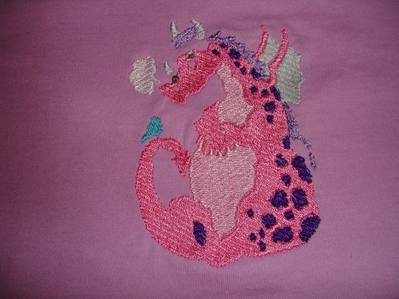
Thank you ladies who answered my question about underlay. I thought it best if I let you see what happened. It started at the spine of the dragon and then the horns were miles away from the top of head. The whole design was meant to have an outline but I knew that it would have made matters worse. I certainly did not bump my machine and stayed by it's side, changing thread :)
DH says our GD will still love it - I am not so sure. Sarah.
1 images:
[1]
Comments (15)

22354✽
by
sewfrenzie
19 Mar 2012
+6✽
Oh dear, I have had the same thing happen to me.
First you want to make sure it’s not your machine by making sure something did not get caught in your machine. Clean out the bobbin area and check it for loose threads that may be causing the issue. They can "catch" and cause the hoop to pull when trying to move to next color and throw the position off. This has happened to me and after cleaning the bobbin area out of loose threads (Lord only knows how they got there to begins with) the design stitched out fine.
If it does it both times, it may be the design. Then you may want to contact the digitizer and let them know of the problem after you did the second stitch out to see if it wasn't just an odd glitch.
By doing a sample stitch out you will have two photos to share with the digitizer to show it happened twice. Be gentle with the digitizer and they will be more willing to work with you. Most digitizers want to know if their design has a flaw so they can fix it. They want happy repeat customers, not angry customers who give negative feedback.
I wish you the best of luck and hope it is salvageable.
Diane
First you want to make sure it’s not your machine by making sure something did not get caught in your machine. Clean out the bobbin area and check it for loose threads that may be causing the issue. They can "catch" and cause the hoop to pull when trying to move to next color and throw the position off. This has happened to me and after cleaning the bobbin area out of loose threads (Lord only knows how they got there to begins with) the design stitched out fine.
If it does it both times, it may be the design. Then you may want to contact the digitizer and let them know of the problem after you did the second stitch out to see if it wasn't just an odd glitch.
By doing a sample stitch out you will have two photos to share with the digitizer to show it happened twice. Be gentle with the digitizer and they will be more willing to work with you. Most digitizers want to know if their design has a flaw so they can fix it. They want happy repeat customers, not angry customers who give negative feedback.
I wish you the best of luck and hope it is salvageable.
Diane

122866✽

234578✽
It looks like part of the head is missing! I don't particularly like outlines, I'm always worried that they won't be right on target. This still looks fantastic. What I've done in the past is sew the missing section by normal stitch on my straight sewing machine or fine satin stitch etc. Love Chris. P.S. I see Meg is on the ball. I'm off to bed it's midnight! Actually it's already Tuesday morning!
1 comment
I also hate outlines, but this dragin really needs the outline to pull it all together. Meganne is going to help me - what a star she is.

111401✽
I agree looks like part of the head is missing. You got some great advice. Do not scrap all you hard work and thread. I would do what Chris said and stitch in the part of the head that is missing either by hand or machine and still use the design. The dragon is so cute too. Love the colors you chose. Suzanne

173695✽
I abandoned a project! I knew I should have tested first. I use 50 wt thread which reigns havoc with a lot of fill designs. It is just too dense. So I am trying to increase its size by 7 - 11%. first one came out good, there were a few longer stitches, however I have seen worse. I will let you know if this method works to solve my problems. I also do not like outlines, although I do like pernament markers, paint and trims to cover and change things. Also I you want, you can thread a needle and fill it in as best you can and it will be fine. Live Laugh Download Stitch!

3099✽
I have an opinion...Is it possible because of many thread changes that you missed one (skipped a color)? It doesn't look like the horns are too high, just no fill between, and some missing stitches at the base of the "spiney back" as well. I have done that, and found out it was operator error. Just a thought, if not, then I would contact the digitizer. Linda
7875✽
I agree that something is missing..
Hope you can fix it a little cos it does not look too hard to add some filler there.
The design looks nicely filled in and no extra underlay is needed.
Hugs Bev
Hope you can fix it a little cos it does not look too hard to add some filler there.
The design looks nicely filled in and no extra underlay is needed.
Hugs Bev

13250✽
No answers here, but wanted to say it is a cute design. Hope you can fix it. Let us know what you do and how it works out please.
7969✽
by
eastwitch2
19 Mar 2012
+4✽
Did you purchase this design or was it free?
Did you have to convert the original design to the format that your machine uses?
Could be a problem with the conversion.
Could be a bad or corrupt file try downloading it again.
If it was purchased contact the digitzer about the problem. Perhaps when they converted the original format to different machine formats there was an error.
EastWitch2
Did you have to convert the original design to the format that your machine uses?
Could be a problem with the conversion.
Could be a bad or corrupt file try downloading it again.
If it was purchased contact the digitzer about the problem. Perhaps when they converted the original format to different machine formats there was an error.
EastWitch2
7969✽
by
eastwitch2
19 Mar 2012
+3✽
Is your fabric moving in your hoop while you embroider? This can cause problems with the design not lining up.
EastWitch2
EastWitch2
1 comment
I don't think you are missing anything.
The horn section should be sitting on the head where the gap is.
Maybe a design problem or your fabric is moving in the hoop while you stitch.
The horn section should be sitting on the head where the gap is.
Maybe a design problem or your fabric is moving in the hoop while you stitch.

38558✽
by
blueeyedblonde
19 Mar 2012
+4✽
The design looks familiar, but I sure don't know what could have happened - I'm watching for other comments.
How old is your GD? Maybe you could make up a fairy tale as to why that area is missing!
How old is your GD? Maybe you could make up a fairy tale as to why that area is missing!

21222✽
Sorry I do not know what happened here, but lots of free dragons here at http://www.thomassewing.com/archive_littledragon.html
1 comment
Thank you for this.

22300✽
by
mysugarfootswife
19 Mar 2012
+3✽
Been there, had that. Ain't no fun. Pitch the design and get one somewhere else. Not that makes you feel any better!
21543✽
by
susiesembroidery
19 Mar 2012
+3✽
This is a very cute design. Pity that the head is not finished. I would simply fill it in with a little bit of fabric paint, especially, if it is for GD. She might love the different texture on top of the head. Otherwise, you had very good advice. Hope you can salvage it, since it is cute.****

19452✽
It is a cute dragon, even if the horns are in the wrong place;>)