













299727✽
Question of the Day: Can you please give me an example of how you are saving your embroidery designs & what you are saving them on to do this? I keep getting mixed up witht these sew I think there has to be a better way to do this? Thanks sew very much
Comments (16)

64451✽
Good morning Lorayle,
I save all my designs by backing them up in a hard-drive that I run maybe once a month. All my purchased files and sets are downloaded onto a separate usb key so if ever anythung happened to my computer I at least will not lose what I paid for.
hugs
Michelle
I save all my designs by backing them up in a hard-drive that I run maybe once a month. All my purchased files and sets are downloaded onto a separate usb key so if ever anythung happened to my computer I at least will not lose what I paid for.
hugs
Michelle

145791✽
Lorayle I save to a a seperate hard drive that is detachable from my cp. Or are you talking of saving and keeping on cp. I have mine in Files on embird with sub-files such as Animals then a sub- file for cats, one for dogs, one for frogs etc./Lillian

1106✽
by
undergroundsue
05 Apr 2012
+6✽
Good question and timely too. Embroidery library just put out a tutorial that is very similiar to what I use. Like he says I tweaked my system to work best for me.

57492✽
This is what my system looks like. I have folders with main categories such as animals, angels,ITH,Xmas etc. Each of the folders would have subcategories for example animals will have folders with: bears, butterflie, monkeys, birds etc some of these folders will be further categorised such as the bird one will have folders with ducks, flamingos, doves etc. All this is kept on 2 computers, an external drive and once every 6 months I will back it up on disks. One set of disks is kept somewhere safe out of the house.
Hopefully so I will never lose more than 6 months of collecting designs. Is it foolproof? Should be but I still sometimes can't find what I am looking for.
Hopefully so I will never lose more than 6 months of collecting designs. Is it foolproof? Should be but I still sometimes can't find what I am looking for.
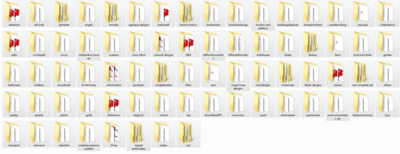
1 comment
This is how I organize my files as well. Of course I did not know to do this when I first started my collections.Now I have a little mess that I work on each night.

169074✽
I save and organize mine using software (ancient now but still works)from Babylock. Yes, my hundred thousand designs are so organized I can find what I need in well under a minute. My backups are thumbdrives and 2 external harddrives.

4105✽
by
moonwillow
05 Apr 2012
+4✽
I have a mess lol..when I first started I only saved the pes file, not the color charts etc..so I am reloading the files I know I will use.and every time I get a chance I try to sort thru and organize ..I also back up daily to an external two terabite hard drive..

4131✽
My Janome 350e accepts 100 designs max at a time on a usb. I download types of designs together onto an individual dongle, eg. ITH, baby, quilt, wedding, Easter, to the maximum 100, I number each dongle and write the contents in a book. I can find what I want quite easily and don't have to keep deleting designs to make room on a single dongle. I leave my husband to do all the backing-up as I'd rather be sewing! Jan

7672✽
I have all my designs on memory sticks in catergories...also on discs.
I have a picture of every design with a note saying which folder they are in and which memory stick.
My machine will not take more than a 2gb..stick so I put the designs I am working on on that and when I'm done I just delete it for the next time.
I know this is not the way most do it.....but it works for me.
When someone or myself wants a design it is easy to look through the albums (I have 4 - all in different catergories) and find what we like... then go to the correct mem. stick to load it on my 2gb. for the machine.
I find this much easier than searching through a program in my computer.
Hope that makes sense to you.
MJDG
I have a picture of every design with a note saying which folder they are in and which memory stick.
My machine will not take more than a 2gb..stick so I put the designs I am working on on that and when I'm done I just delete it for the next time.
I know this is not the way most do it.....but it works for me.
When someone or myself wants a design it is easy to look through the albums (I have 4 - all in different catergories) and find what we like... then go to the correct mem. stick to load it on my 2gb. for the machine.
I find this much easier than searching through a program in my computer.
Hope that makes sense to you.
MJDG
1 comment
Forgot to add that along with the pictures I have color charts printed also, and every page is in a clear page protector and easy to take out and lay by my machine when I am doing a design.
11271✽
I use AnnTheGran Catalog Xpress organizing software - it is very much like the BuzzTools version. It lets you set up folders to categorize the designs by dragging and dropping.
I store the actual designs on my computer by site (Like Cute, Amazing, DBS, etc.). I back up to an external hard drive regularly. I back up to DVD's occassionally and store them away from my house.
I store the actual designs on my computer by site (Like Cute, Amazing, DBS, etc.). I back up to an external hard drive regularly. I back up to DVD's occassionally and store them away from my house.

38558✽
by
blueeyedblonde
05 Apr 2012
+4✽
I copy the d/l to a memory stick and then put them on my emb. laptop and when I can get to it I open them and file them in folders - I have many folders, eg. sports and then sub folders in it with baseball, soccer, basketball, etc. I also back up to an external hard drive - I have 2 - one of them automatically backs up my pc every 2 hrs.(but this one is for everything), and then I have another one that is just for my emb. designs whether I have gotten them open and catagorized or not. Then I also decided I should have another option after some of the things that have happened to other cuties and I have all my embroidery designs on a usb stick.

12667✽
I store my designs in folders - purchased designs per digitizer and freebies per category. I keep a external hard drive backup as well as a dvd backup of the purchased designs. Interestingly I have now discovered that I can connect a cd rom drive to my machine (where I normally would use the usb memory stick) so I am in the process of burning cd's per digitizer per category and storing them in a cd storage unit. I now only pull out the cd, slot it in the cd drive and away I go.

33871✽
by
grandmamek
05 Apr 2012
+1✽
I use Buzz Explore and put my designs into folders by catagory, digitizer, I have two external hard drives that I use for backup. I can always find what I am looking for in a very short time.

26714✽
i have memoryssticks and CDs i like CDs better i can write a brief description of what is in it.Oh and I have them in folders
299727✽
you have all been really helpful & I was wondering no one has mentioned how they save or if they save where the designs comes from, except pcteddy. Do you save by site like this? Designs from Cute EM & then Bunnies or Easter? or do you save under bunnies & then Cute or do you even save the site? I appreciate the help as I am finding it abit overwhelming. I have multiple usb sticks & I don't know what is on each one? How do you do the infor for them

3 comments
especially if they look the same
All my designs are listed by name. For instance in the Flower folder it will have sub titles of Roses, Daisies, etc. Each design has a name and/or number. After the name or number I put CUTE if it is from here...EMLB for Embroidery Library, AMZ from Amazing Emb, OPW for Oregon Patch Works, etc.
I didn't make note of a lot of designs when I first started collecting freebies and those are on a separate stick and album. I know that those must be tested because I don't know where they came from and if they've been tested. This is also all noted in my albums.
MJDG
I didn't make note of a lot of designs when I first started collecting freebies and those are on a separate stick and album. I know that those must be tested because I don't know where they came from and if they've been tested. This is also all noted in my albums.
MJDG
OPW from Oregon Patch Works, etc. I didn't make note were they came from when I started collecting freebies so all those are on a separate stick and noted in my album..so I know to test those.
MJDG
MJDG
21543✽
by
susiesembroidery
05 Apr 2012
+1✽
I catagorise mine, i.e.: children: girls boys, babies, etc. I do not know how to put them into files (Still not very sure about the way to work with some things on the computer) Most of my designs are on USB sticks, which are accessable to my embroidery machine. I save them such as: child teddybear picnic Cuties and their reference No. for instance. Hope this helps a bit.***
1 comment

I lost some designs on a usb stick. When I put stick into computer it failed hence everything on stick was lost, I do not save to usb stick only anymore. Shirley

20276✽
Hi there.. when I download any designs I always put the designers initals at the front of the design/folder..I save all mine in their own folders.. for instance I have one for Cute, one for amazing and so forth..I have a folder with sub folders in containing animals, flowers, fsl ect as I do not know where I oringally got these designs. then all my folders I store on an external hard drive, thus keeping my pc memory nearly as new.. for quick boot up ect.. I back up my external hard drive at the end of each month.. onto dvd's,
Big hugs from London - Maria xx
Big hugs from London - Maria xx