













with so many new designs coming from Sue Dewsbury you may like to create a folder to put tehm all into. the next thing is to save the instruction that go with them. for beginners here is how you can do it for ease of reference later.
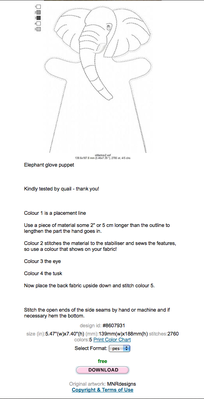
make a file for all of sues designs, find the one you want to do and download the design.
come back to the instructions and left click and highlight the instructions and then right click and copy.
open a blank word document and paste the instructions into it, you may want to reduce the space between the lines of information so that it fits onto a page easier. save the file under the name of the design in the folder for Sue's designs,
now you have the info at your fingertips whenever you need it.
finally give a flower and thank you to Sue for her hard work and generosity
this of course works for any other detailed information you may want to save from any other designer.
annie in the uk


I have also made a folder for all the dolls and puppets of Sue and mops (think they belong together especially the handpuppets). I always made a jpg from the pic and the instructions so I have it all together in one (word-program is never open on my mac so jpg is faster for me ;-).
Greetings, Bettina

if you just have the computer desk top window open and have the curser on a clear spot you can right click the mouse and a tab opens put the cursor on the word NEW. another tab opens and you will see the word FOLDER.
Click folder and it will place a folder onto your desk top for you that says "new folder".
right click on the new folder and another tab opens look and you will see. RENAME.
left click on that and the word new folder is highlighted. you can now typ in a name for this folder. I.E. Sue's designs.
you now have your folder to place items into.you can download Sue's designs into that folder.
once the design is in there you can then highlight the instructions and click copy.
open microsoft works or whatever document pag you use and paste the instructions into the that and then click save as.
you now have a file to put into the folder. so where is asks for the file name you type in whatever the design name is then choose to save in the folder called sues designs. click save and the document file you have just produced will be saved in the folder named sues designs.
i hope this will help you.
annie in the uk
