













299726✽
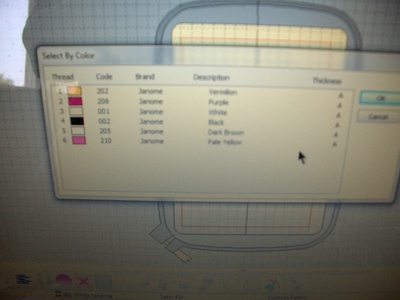
Ladies I just got off the phone with my Janome Dealer & she thinks it is the fault of the designs? I am attaching a picture Some designs are spot on & some are way off hopefully this will help
Comments (14)
299726✽
sorry it is a bit blurry but as you can hopefully see it says on the left the color box & # then Janome then this is where it gets goofy if you see # 5 the box is whitethe color says dark brown? #3 is actually beige & #5 is white?
2 comments
the design that I brought up is a free one from Adorable Applique but this is happening with many designs Not just from there & sometimes they come up just perfect
ttt

17161✽
by
bikermomfl
15 Jun 2012
+10✽
If your only problem is the colors are off, relax my colors almost never download the way the picture shows them, so I have to correct them when I unzip and sort them.
5 comments
yes but the thing is when I send this to the sewing machine I can't always tell what is color is going to stitich out sew if it is wrong I have to go back to another room to check the laptop & zoom in the design
what I mean is if I can't see the color white & it reads green then how do I know it is wrong, especially if I can't tell what is being stitiched ie: flower, stem, stamen whatever?

I advance the stitch and determine where I am in the design and then back-up. I have to do this for all my machines, none of them are trustworthy. So I guess the problem continues with the "brand new" machine. Good luck to you!
I have an arrow that will auto go to the next color & if I need to go by the stitches either forwards or backwards I can go one stitch @ a time
I do go one stitch just to figure out where I am, then I load correct thread color. also this is why test pieces are so important and it would bve wonderful if there was a way for digitizers to put in better instruction.

6340✽
by
marcellelewis
15 Jun 2012
+10✽
I think most people go by the color charts for each design. That way you know the stitching order.
Marcelle
http://embroidery.gotop100.com/
Marcelle
http://embroidery.gotop100.com/
2 comments
this software program was almost $1500.00 it is supposed to do all of this itself, & well under my circustances it was supposed to be less brainwork for me! Which until I am fully recovered was exactly what I need
That is a lot to pay. Would your other software not work with the new machine? I stopped buying upgrades to PEDesign because of the rising cost and limitations of the software. Marcelle

23163✽
by
greysewist
15 Jun 2012
+7✽
Are there inbuilt designs on your machine to check they are correct? This does look a bit weird. Usually the techs sew out inbuilt designs to check things are right. I guess there would be a lot of variables in digitised designs as to what software is used etc.
1 comment
some of the built ins are fine but not all

78119✽
I am unable to help you with your Janome, but one way to know what you are embroidering is seeing it in Embird first. The basic Embird is not expensive and lets you see, edit and print your designs before embroidering them. I don't embroider any design if I don't see it first in Embird.
Hugs, Lidia
Hugs, Lidia
3 comments
I like to check them out in Embird first as well. Shirley

I have not been able to affored the embird so I have the one from DebraJones that was only 15.00 and works great...you can do so many things with that program, for that price is almost a gift!!!

mariahail, would you mind sharing more info about the program you use? Where can one access it? Thanks

7293✽
Use the color chart that comes with the design and ignore the color you see on the screen. What is happening is the digitizer's software is using a thread brand other than Janome and your machine is doing it's best to translate the colors to Janome's thread colors. There is nothing wrong with your machine or the design. The colors are just getting confused in the translation.
1 comment
actually I have a thread conversion chart built into the machine & it has a bunch of different thread charts Most of the designs are in Maderia sew I have gone into this & chosen Maderia40 & added & replaced all of the colors & it still won't work properly
299726✽
I am not sure what difference if any this makes but I have my old digitizer program for my other Janome 10001 & if I put the exact same designs in it & check the color chart it comes up EXACTLY RIGHT NO GUESS WORK AT ALL IF I DON'T LIKE THE COLOR I CAN CHANGE IT BUT I DON'T HAVE TO THINK THAT IT WILL BE WRONG?
2 comments
My old machine is just that old & it is tempramental sometimes it works sometimes it won't thats why I have the new one & I had to buy the new software becasue my old one wouldn't work with the new machine
I just don't know what to do?sigh......
16311✽
by
justonlyme
16 Jun 2012
+4✽
My machine renames just about every color, according to the brand colors. You can go in and change that. Mine is a Brother and names the colors according to what Brother has in the Disney collection. When I save designs, I try to save the .jpg image as well, so I can see what the original colors were. Then, I can chance them according to what I want.
7875✽
I have pe- design and pes format.
I will always spend some time checking that the design is centered and what colour each step requires.I make notes for adjustments cos printing cost money I try to limit it. Then I will copy to my card for the embroidery machine.(Innovis 1500 by Brother).I will choose colour the closest I can, for the threads that I have.
Hardly anything is straight forward in this lovely hobby of Embroidery, but I do enjoy all of it.
Happy Stitching Everyone!
Hugs Bev
I will always spend some time checking that the design is centered and what colour each step requires.I make notes for adjustments cos printing cost money I try to limit it. Then I will copy to my card for the embroidery machine.(Innovis 1500 by Brother).I will choose colour the closest I can, for the threads that I have.
Hardly anything is straight forward in this lovely hobby of Embroidery, but I do enjoy all of it.
Happy Stitching Everyone!
Hugs Bev

10333✽
How frustrating for you.
Can you not just take your laptop into your sewing room so that you can see the full design in colour on the screen as you go?
Can you not just take your laptop into your sewing room so that you can see the full design in colour on the screen as you go?
57811✽
by
edithfarminer
16 Jun 2012
+3✽
I NEVER count on the machine to tell me the colours as it is mostly wrong(I have a D1). I either go by the colours given by the designer or change to suit as I like it.
I mostly write it down on a bit of paper. so that might be a good idea for you. Write your colours down and take it with you to the machine.
I mostly write it down on a bit of paper. so that might be a good idea for you. Write your colours down and take it with you to the machine.
1217✽
If the design uploads to your 10001 correctly I think your new machine has a problem. If it is a Janome programme & Janome machine it should read the same as the 10001. Check your warranty. What model is your new Janome?
2 comments
ITS THE jANOME 11000, & THE SOFTWARE IS BRAND NEW THIS YEAR IT ONLY CAME OUT IN THE SPRING MBX V4
Can you try the design through Customiser 10000 & see if it reads correctly to the 11000? No matter what software, white should read as white.

52686✽
by
shirley124
16 Jun 2012
+2✽
If colors are not right with the machine and in the digitizer program by all means take them to your dealer and INSIST they check it out.
1 comment
i HAVE BEEN TRYING TO DO JUST THAT

20661✽
Sounds like your software is screwed up. Why not use the old software instead since it is accurate or use the color chart for the design.