













60✽
Hello to all of my new embroidery friends. I just joined this site today and and I tried to open some of the free designs which are just wonderful and I could not. Can someone tell me how to open them so I can download them to a memory stick PLEASE?
Today's free design

A free embroidery design every day
Cute Embroidery gives away one design every day, and the community votes for tomorrow's.
Comments (21)

6196✽

186310✽

10173✽
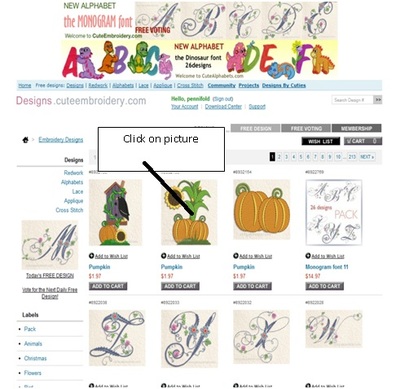
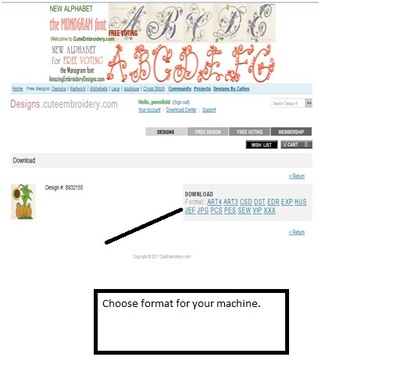
You just go to "designs by cuties", scroll and choose your design, click on the pix, and it will take you to the design to choose your format & download. Be sure to thank the wonderful generous people who make this available by leaving a comment.
2 comments
And welcome aboard--you will love it here, and you'll learn all kinds of good information.
If the design has been there for quite a long time, or is more than about 10 pages back, don't leave a comment, or it messes up the categorized files people have created. A flower is always nice, and doesn't change the order!

59631✽
by
hightechgrammy
25 Aug 2012
+10✽
Hi Welcome to Cuties! You have found the best site on the internet for sharing friends, wonderful designs, and all the advice you can ever need! What kind of computer platform do you use? All I can tell you without knowing is to right-click on your mouse (if PC based) and save to the file you want it to be stored in. You transfer them to your memory stick in an action no using the internet, just on your desktop. You should only be able to actually OPEN them, within your embroidery machine, or embroidery program. They don't open just be clicking on them. I hope this helps! Hugs from Jan in Colorado
1 comment
You move the files without opening them.

33079✽
by
catsnhorses
25 Aug 2012
+10✽
Welcome to the Cute family. I assume you're trying to download the free designs from Designs by Cuties (those are the free designs on the site + the 1 free alpha letter per day)? If so -
1-click Designs by Cuties which is the last link in the thin blue box towards the top
2-when you find a design in the list that you like, click on it to open it,
3-below the picture of the design with its information, click the drop down arrow and highlight your format
4-click the Download button
5-a box will open, click 'save as'
6-at the top of the save as box, there's another drop down box to define where on your computer (your hard drive, USB or whereever) to save it
7-at the bottom of that box, name the file whatever you want to call it
8-click the Save button
And enjoy! Again, welcome to our family.
Marion in KY
1-click Designs by Cuties which is the last link in the thin blue box towards the top
2-when you find a design in the list that you like, click on it to open it,
3-below the picture of the design with its information, click the drop down arrow and highlight your format
4-click the Download button
5-a box will open, click 'save as'
6-at the top of the save as box, there's another drop down box to define where on your computer (your hard drive, USB or whereever) to save it
7-at the bottom of that box, name the file whatever you want to call it
8-click the Save button
And enjoy! Again, welcome to our family.
Marion in KY

62461✽
Looks like you got a good response for you question. WELCOME. If you downloaded the format that your machine and or software uses you should be able to see them, as described by the first 2 responses.
41781✽
115807✽

360672✽


743373✽

5402✽
Welcome to cuties from me here in the uk. You will love it here, just dive in and don't forget to ask anything you like some one will answer you very quickly.

33451✽
by
marjialexa
25 Aug 2012
+8✽
Welcome to the Cute Community! I see you've gotten your answer. If you have any other questions, just ask, someone will be glad to help you. We're so glad you're with us! Hugs, Marji


24961✽
Welcome to Cute! You have found the greatest group I have ever come across! Everyone here is very friendly and helpful and most have tons of knowledge about embroidery. Look around and if you need help, just ask and someone will almost always come through for you. Again, Welcome! Linda
78119✽


18031✽

158720✽
I just wanted to add my welcome and tell you that I'm glad that you are here.;)

255066✽
I see you have your answer so I will just welcome you to the best place on the net - just one warning this site can become very addictive. Sarah (South Africa)


26316✽
by
juanitadenney
26 Aug 2012
+5✽
Welcome to Cute! Best site ever, your new friend in Missouri. Juanita

234581✽
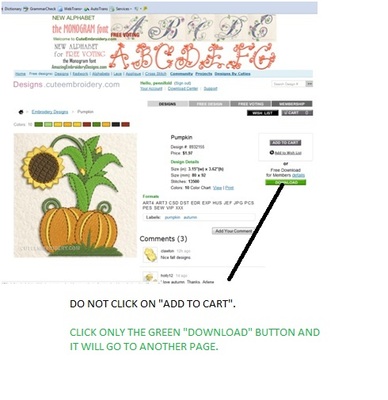
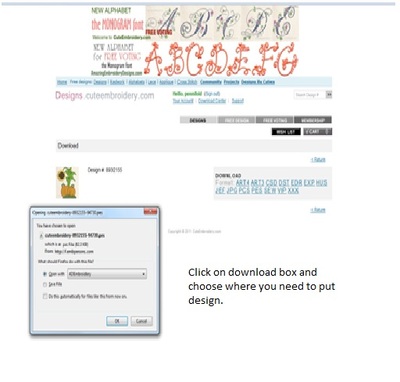
A big Aussie welcome from me Odell. I am assuming that you have become a paid member and in that case you can download all the above designs. Click on DESIGNS, REDWORK, ALPHABETS, LACE, APPLIQUE AND CROSS-STITCH. As you have already been told by others you can also download any of the DESIGNS BY CUTIES for free. I have included a page of directions on how to access the designs. Love and blessings Chris
2 comments
Just wanted to remind you not to click on ADD TO CART but only click on THE PICTURE OF THE DESIGN. Hope this is of help. Love Chris
Oh, Chris, good job on the picture tutorial! Nice use of text boxes, I just used my finger on the touch pad, much messier, hee hee hee. Well done. Hugs, Marji

148939✽
6788✽