













7875✽
Request?External Hard Drive backup information.
I would like to know how to only copy over the files/folders that I have altered in the last month.
I would usually overwrite the whole lot,but that takes forever. I would appreciate any shortcut and tips you might have for me.
Thanks and hugs Bev
Comments (9)

255066✽
Good question Bev - I am afraid that I cannot help you but I look forward to some answers. Sarah.

28916✽
Would also like to know, hope someone will have the answer. Thanks for asking

27358✽

57492✽

145792✽

32948✽
by
jofrog2000
27 Aug 2012
+7✽
If you are selecting and copying folders manually (without an automatic backup program) I would just change the name of the folder -put an "A_to" for "added to" and then know which ones to copy over.
When you've done that, go back and remove that from the end of the names. Might take a minute here and there, but would let you know which ones at a glance.
Jo
When you've done that, go back and remove that from the end of the names. Might take a minute here and there, but would let you know which ones at a glance.
Jo
1 comment
Thank you Jo - I will try this.

6803✽
by
bnilla9241
27 Aug 2012
+4✽
Thank you for asking Bev, and thank you Jo for your reply.
Curious Hugs, Bonnie
Curious Hugs, Bonnie

122866✽
You need to set up a custom backup and one of the options is to replace all the files, the other is to only add new files created since the last backup.
Usually this is done as a Sheduled backup and it requires you to set up a password for it to run correctly.
You can set it up from Accessories\SystemTools\SheduledTasks
Alternatively you can set up Back-up from Accessories\SytemsTools\Backups
Either procedure will allow you to choose "Advanced Options" and you will find the choice of HOW you want the backup to be made in AdvancedOptions.
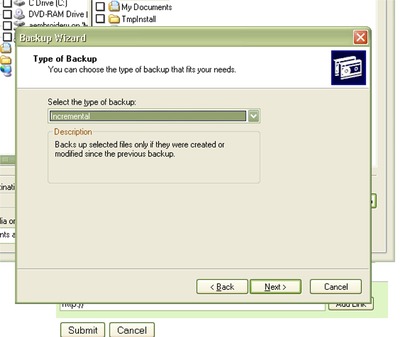
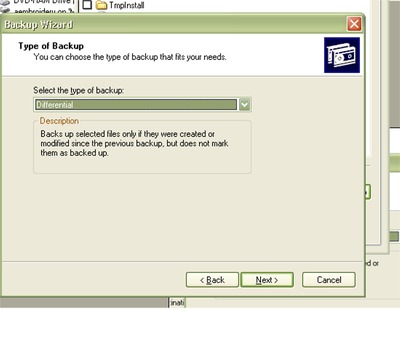
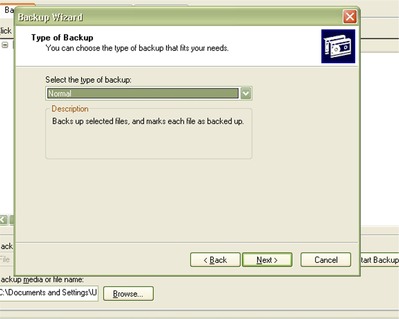
Please see the photo's below and read the DESCRIPTION underneath the type of backup
First One is INCREMENTAL
Second one is DIFFERENTIAL
Third one is NORMAL
There are two other choices
The choice you want to just add files Created or Modified since the last backup, which will mark the files as being Bkdup, is Incremental.
Clear as mud!
If you need more detailed instructions, please let me know as I have only written these up very quickly and have not gone through all the steps.
hugs n roses, Meganne
Usually this is done as a Sheduled backup and it requires you to set up a password for it to run correctly.
You can set it up from Accessories\SystemTools\SheduledTasks
Alternatively you can set up Back-up from Accessories\SytemsTools\Backups
Either procedure will allow you to choose "Advanced Options" and you will find the choice of HOW you want the backup to be made in AdvancedOptions.
Please see the photo's below and read the DESCRIPTION underneath the type of backup
First One is INCREMENTAL
Second one is DIFFERENTIAL
Third one is NORMAL
There are two other choices
The choice you want to just add files Created or Modified since the last backup, which will mark the files as being Bkdup, is Incremental.
Clear as mud!
If you need more detailed instructions, please let me know as I have only written these up very quickly and have not gone through all the steps.
hugs n roses, Meganne
4 comments
Oh! grand. This is what I am going to do. My DS showed me all this last year. But I have forgotten, Will copy your explanation to my notebook.
Thanks very much.
Thanks very much.

Thanks, Meganne, for this step by step explanation. I'll copy that to use in the future.

exellent advice and very well written
meganne huge hugs for you :-)
Maria xx
meganne huge hugs for you :-)
Maria xx
AAAwwww Meg you are so smart. thanks/Lillian
7875✽