













3101✽
I love the birth announcement designs where everything fits kind of like a cross word puzzle but turned at different angles...can someone tell me how you do that? Or does it require special software? I may have put this in the wrong area...sorry. Becky
Comments (8)
3101✽
I don't think I've explained this very well 'cause I know y'all have seen these...it's different fonts with different colors and will have the name, date, birthweight...I think I saw one in the projects on 8 claws and a paw site...someone did one...I want to learn how before my daughters quads come....:-(
1 comment

I saw that and I thought it was great but I dont know how to do that
4309✽
Do you have a link for the picture you saw? I'd love to see it and looked over at the 8claws site but couldn't find it. Also you might consider contacting the site owner (where you saw that stitch-out) and ask for your 4 baby's names to be made into similar designs for you - expect to pay for those if you do indeed ask though. :) xXx
1 comment
See the response from clintonms....that's what I am talking about....I don't know if I can do it or not, but I sure think it's pretty...thanks for the help

39739✽
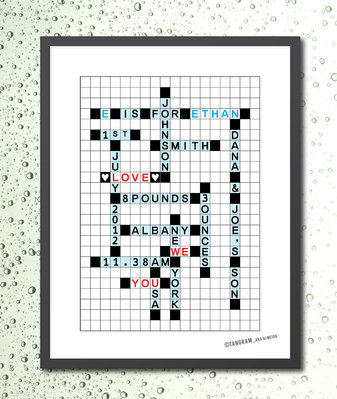
Found this one on google.
"Custom Baby Boy Birth Announcement Crosswords, A3 Poster Nursery Art Print. Typography on squares. Baby Boy Nursery room. Kids room gift."
hugs Helen
"Custom Baby Boy Birth Announcement Crosswords, A3 Poster Nursery Art Print. Typography on squares. Baby Boy Nursery room. Kids room gift."
hugs Helen
1 comment
very cute....Thanks!

33986✽
Hello Becky,
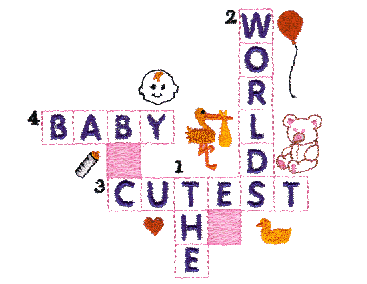
I could just suppose that you have to design this yourself p.e. with embird.
Have found just one design and there is no possibility to put in your own lettering. But your post gave me a good inspiration to try it now for myself ;o)
Greetings, Bettina
I could just suppose that you have to design this yourself p.e. with embird.
Have found just one design and there is no possibility to put in your own lettering. But your post gave me a good inspiration to try it now for myself ;o)
Greetings, Bettina
1 links:
[1]
http://www.embroidery.com/product.asp?sid=&owner=para&productid=32747
www.embroidery.com
1 comment
Thanks for the help!!!!

145307✽
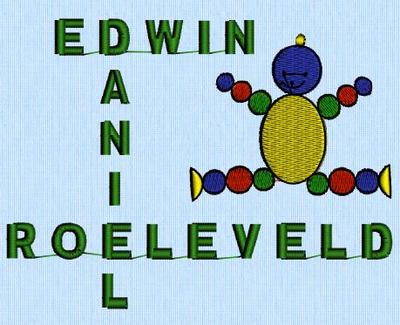
Years ago I made a couple of presents like that - never took a picture of the project, but here's one from the software (I did save the designs).
At the time I first made a drawing on paper, playing with placement, then used the lettering in 3D to get the names, using the layouts for horizontal and vertical as necessary. You can do that for all facts you want to get in.
Then I placed them as I wanted and removed the overlapping letters - in my case the D and an E. I Of course I could have done Edwin, Roeleveld, ANI and L and aligning the parts afterwards but at the time I found it easier to get the distances right using the first method.
If it gets too big for your hoop you can split the design.
I've done more elaborate ones as well, it's not too difficult.
At the time I first made a drawing on paper, playing with placement, then used the lettering in 3D to get the names, using the layouts for horizontal and vertical as necessary. You can do that for all facts you want to get in.
Then I placed them as I wanted and removed the overlapping letters - in my case the D and an E. I Of course I could have done Edwin, Roeleveld, ANI and L and aligning the parts afterwards but at the time I found it easier to get the distances right using the first method.
If it gets too big for your hoop you can split the design.
I've done more elaborate ones as well, it's not too difficult.
1 comment
THanks so much!!!!
33986✽
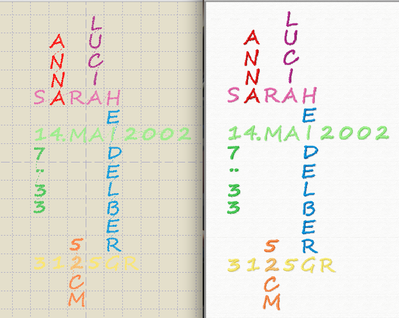
Your idea was so inspiring had to play a little in embird ;o)
I used the garting in EDITOR and filled in the letters (keepsakefont from madwomanoflockestreet). Only could not decide with the colors for the different parts but this is just my first quick blueprint :o)
Greetings, Bettina
I used the garting in EDITOR and filled in the letters (keepsakefont from madwomanoflockestreet). Only could not decide with the colors for the different parts but this is just my first quick blueprint :o)
Greetings, Bettina
1 comment
Thank you so much....I know I can always depend on my cute family to help!!!!

360672✽
5431✽
by
clintonmiss22
05 Sep 2012
+3✽
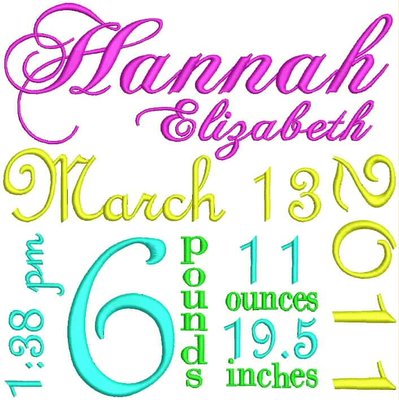
Is this what you mean? You just have to play with different fonts, sizes and directions, and then be able to import them into the same screen. Sorry can't explain it very well.
4 comments

WOW! That looks great!
I didn't do this one; it's just an example of what I thought Becky might have been looking for. (Don't want to mislead anyone.)
This is it!!!!! I am so sorry if I have mislead anyone with the crossword analogy but didn't know how to explain it...now...how do you do this????
Okay all you seasoned embroiders out there...how hard do you think this is to do? I wonder how much time this takes....but isn't it great????