








318630✽
Something puzzling...I downloaded some Rar zip files...then I unzipped them in Embird...when I opened the unzipped folders...they looked empty...I went back to Embird and clicked on the blank screen where the file should have been and then clicked to convert to .pes...it went through the conversion and said .pes was already there did I want to save over...I said yes...and still no visible file...I re-unzipped the rar files and watched them process in Embird and the file formats looked like they were unzipping just fine...but again, the folders looked empty...anyone got any thoughts here?
Comments (13)

122866✽
Try unzipping the RAR folder using a different program.
I seem to think Embird only likes WINZIP folders.
HNR, Meg
I seem to think Embird only likes WINZIP folders.
HNR, Meg
2 comments
I agree meganne I thought the same :-)
I have always opened Rar files with Embird with no problems...this is the first time I have had folders that looked "empty", but if I go to the "Properties" of the folder it shows that the folder has files in it...I just can't see them or access them...I am stumped.

16251✽
by
terriweistra
30 Sep 2012
+5✽
I have had the same problem, the folder is generated but empty!!!
480✽
the files are hidden. Use "my computer", Locate the file folder you have the designs filed in. You should be able to see the files. Highlight the files, right click and select "properties" (should be on the bottom of the list). "Attributes" is located near the bottom of page. You should see that the "Hidden" check box is either check or filed in. Click on the "read-only" box and then the "Apply" on the bottom and the "OK", You should now be able the see your design files.

5172✽
This may sound strange...but I have SewIcon and sometimes it looks like there are no designs...but only because they are shown in white and it disappears into the white background. Clear as mud right?
Muffy :)
Muffy :)
2 comments
So what do you do to see them?
I would have to change the color of the background of my computer (which I really don't want to do). I can see them in my embroidery software and if I then want to make them more visable I can change the thread color from white to another color and then they will show up.
Muffy :)
Muffy :)

33986✽
To unzip a rar-zip is extremly complicated on my embird (have also to jump forth and back; maybe cause I use embird with parallels on my mac).
So I have dl now 7-zip (found this tip in an old post from Eva Jungermann) and that works much better for me ;o)
Greetings, Bettina
So I have dl now 7-zip (found this tip in an old post from Eva Jungermann) and that works much better for me ;o)
Greetings, Bettina
1 links:
[1]
http://www.cuteembroidery.com/3502197_was-someone-here-awhile-ago.html
www.cuteembroidery.com
2 comments
I opened three dozen rar files...25 of them were just fine...the others were "empty", but the properties showed that they all actually had files in them...I just can't see them or access them...and the properties box selection shows "read only"...I'm stumped...
I have to admit that even after 4 years I'm still fighting with embird (have studio but never learned to use it). I'm happy that a member of the german page for "crafty people" (Hobbyschneiderin :o) had offered an introduction for embird basic so I'm able to use some of the functions ;o)
Greetings, Bettina
Greetings, Bettina
57323✽
318630✽
by
dragonflyer
01 Oct 2012
+4✽
Thanks for your thoughts...just for additional info...I have opened dozens of Rar files with Embird and no problems...this is a first...most of them opened just fine...about 10 of them look empty...If I go to "Properties" for the "empty" folders, the Properties show that there are lot of files in each "empty" folder...I just can't see them, and the box in Properties is checked "Read Only"...not "Hidden"...so, not sure what's up here...

20276✽
think i may have it.. on embird start up..
click on options, then asscioate extensions.. ensure .rar is ticked..
Big hugs from London - Maria xx
click on options, then asscioate extensions.. ensure .rar is ticked..
Big hugs from London - Maria xx
1 comment
Nope, the .rar is selected...thanks for trying...I know the files are there somewhere because when Embird unzipps the files it runs through the format file names as it unzips them...just nothing to see when you actually open the unzipped file...
318630✽
by
dragonflyer
01 Oct 2012
+4✽
Okay, so I have a question...and if the answer is no, please don't get your panties in a wad...I am just asking...would it be okay to send the zip file to someone and see if they can open it...or would I be in violation of copyright law?
2 comments
Why not just send them the website and they can download themselves - without violating copyright? Is it not perhaps safer in the end? Just asking.**
They may not have an account there...
20276✽
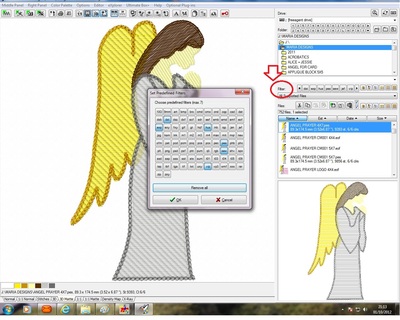
you can tell i have been playing with this lol.. I checked the iconziser extentiions not in there.. but my accident, in manager i clicked on filter as marked in the image.. you can select extentions here.. .rar not selected for me and I have no rar files to check with lol.. please let me know if this helps
Big hugs from London - Maria xx
Big hugs from London - Maria xx
2 comments
No...that's not it either....rar is selected in Manager as a supported file...Here's the thing...it has always opened other .rar files...I d/l 36 files...it opened all of them, but 10 of them were "blank" inside...I know files are actually there, but they are invisible...the folder properties indicate that there are files there showing the number of files in each folder and the file size...but the files themselves are invisible...hope I have explained this okay..I appreciate your tenacity and help...I am the same way...I need to figure this out!
you have to laugh.. its just taken me a week to work out why i lost my hoop being shown in studio.. turns out i changed the colour to white and as my background is white it could not be seen.. drove me nuts and i felt so silly lol
20276✽
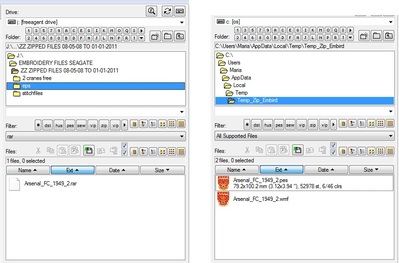
i done a search on my external hard drive and found 1 .rar file.. when i select it in embird using show rar file it only showed me a blank page.. but when i double clicked on it it opened in a temp folder as in my images.. as this is the only rar file i have to play with

109902✽
by
crafter2243
01 Oct 2012
+1✽
If you go to the folder by going through your computers Windows Explorer and see if there are files in the folder and If so create a new folder and move them there. See if this works.
1 comment
I want to add that I unzip through 7-zip which means it creates a new folder and I than can look in it.
318630✽
by
dragonflyer
01 Oct 2012
+2✽
Okay, an interesting development...I was experimenting with the opened and "empty" unzipped .rar files and stumbled upon something in Windows about "Hidden Files" and I needed to go to the file options and select show "Hidden Files"...when I did this, the unzipped rar files showed shadow pictures...I clicked on one and Embird opened...I then right clicked on the folder in Embird in the CDrive area (not the individual file) selected Convert and chose .jef...and voila the files converted to .jef and showed up in the files area below with the file images in .jef format...wow! So I had to do this process with all of the unzipped .rar files...for some reason, these particular .rar files had all of the files inside in hidden folders...don't ask me why...but I did finally get all of the files converted to .jef and reconverted to .pes. I tried converting to .pes but the original format was in .pes and even when I replaced the files in the conversion selection to replace the .pes with .pes...the files remained invisible...I had to choose another format for the files to convert to and then they were visible...Wierd! Any thoughts here? Thanks, Cuties for all of your efforts in helping to solve this mystery...maybe this may help someone else in the future...
2 comments
interesting !!.. I wonder if the file version made any difference.. as pes has different versions, so glad that you finally got to your files via trial and error but thats the best way to learn in my book lol..
Just FYI..it wasn't the file version...when the folder contained .hus or .jef and I used that to "convert" the results werre the same...invisible...it was only when I changed the format to another (any other) that the files were converted to the new format and were now "visible"...I am guessing it was the way the files were either constructed or saved as a .rar zip...because this is the first time I have encountered a problem with a .rar file...and only about ten of the 36 were this way...