








86901✽
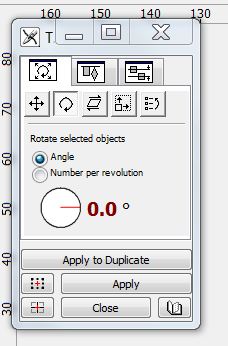
I would like it if one of you ladies that has Embird could tell how can you see or if you see the transform window in program. I can go to the word transform and go the left, right etc. But would like to be able to go the few degrees turn and can't do it due to the window letting me see my options.Under the word transform it don't have that option.
Comments (3)

140725✽
Make sure the bit you want to rotate is selected, then choose the transformation window from the transform menu.
Good luck - you are going great guns so far and trying much more complex digitising than I am!
Good luck - you are going great guns so far and trying much more complex digitising than I am!
1 comment
This is the part I can't see to work in. I saw it in the help which hate reading. Mine is like a minmised size and I can't max it like seen here. Guess there is software booger and now not sure what to do. The sq comes up like to half or less of the first three boxes showing.

2109✽
Another way is to select your object. Put your cursor over one of the black squares in one of the corners then hold down your RIGHT mouse button. The lines around the object will go red and your cursor will be a circle with a direction arrow. Moving your mouse now will rotate the object. If you grab the black squares on the straight sides this will scew the object. It takes a bit of practice but is a very good shortcut when you get used to it.
2 comments
Thanks - I didn't know this!
From the half seen button on top row not tip top I have tried and seen the directional arrow by right clicking it would not move. Will try to see if I got the black squares. Thanks Sue!
2109✽
PS There is a free video lesson at flying needles that shows you how to use this method. Even if you don't have Font Engine it is worth watching because it shows you how to move, scew and duplicate selected objects. Hope this helps. Suet
2 comments
Thanks will check see if I can get something working from watching.
http://www.flyingneedle.ca/snowflake-names/
This is the link for the free video (somehow it did n't attach to my oringinal post)
This is the link for the free video (somehow it did n't attach to my oringinal post)