








261163✽
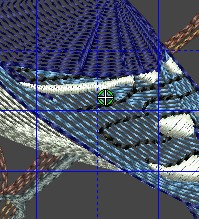
Help needed from cuties with Bernina V6Plus.....my software has gone haywire and nothing is working correctly...I have an email into tech support, but we that have Bernina's know how prompt they are (NOT). Anyway, I have found some work arounds some of the issues, but I have that green circle with the white cross hair in the middle of my digitizing screen and can't remember how to get rid of it. Jim has uninstalld and did a clean install of the software twice, to no avail...........anyway, I would be delighted to get rid of this circle and the cross hair thingy in the middle of my screen......any suggestions???? See pic below as to the circle thing I am talking about.......
TIA....Vicki
1 images:
[1]
Comments (6)

158720✽
Arrange: Start and End design point?
2 comments
I will try that Jerrilyn.......thanks.....
No, it just moved the thingy to a different part of the design..LOL....see all the factory defaults came back when Jim reinstalled the program, and I can't find in the help what that thing is even called.....

6788✽
My experience has been that Bernina's support isn't always the best. I have no clue, but perhaps you can try to call a Bernina dealer close to you. At least you'll get a real person.
1 comment
Hi Penny......did that already and they are having issues as well.........dog gone it!!!

27382✽
I am not sure what that is in the Bernina software, but in Janome Digitiser Pro/MB that is the end stitch. The start stitch has a square and the end stitch the cross hairs in a maze.It lets you know where you have finished digitising that section, so why would you want to remove it?
To temporarily remove to take a screen print of your design image,you can press the B button on your keyboard.
To temporarily remove to take a screen print of your design image,you can press the B button on your keyboard.
2 comments
Thanks so much, Ricky, I will give that a try. I needed to remove it to take a screenshot.....will let you know what happens...Vicki
I tried just hitting B and then tried it with control B and nothing happened except the computer made that "I am not going to let you do this" noise......I did hear from Bernina tech today and he has instructed us to do a clean install, which is what we did last night, but we will try it again........Thanks so much for trying to help me.

57675✽
Have you tried pressing the "Esc" or escape key? I don't have this software. However, many software programmers use escape for things like this.
Is the info in your manual? Check your Onscreen manula page 241 to see if it has a fix.
Is the info in your manual? Check your Onscreen manula page 241 to see if it has a fix.
2 comments
Thanks for the info, however it is a program issue........
After further research...The escape key is a shortcut key in your software -- but I doubt it will fix this problem. I hope they get back with you soon! Good luck and thanks for all you do for Cute
261163✽
by
basketkase
01 Feb 2013
+4✽
Yippee!!! The clean uninstall and clean install worked. This spot is gone on my artistic view and the software is once again working!!! Thanks for your suggestions, everyone!!
2 comments

Great to hear you are sorted out. Hugs my friend.
I am so glad it worked! Now, you can get back to making those wonderful designs you create. :)
1952✽
by
angelmakes3
01 Feb 2013
+3✽
Hope you get it fiqured out. That looks like my blue jay. Pat
1 comment
It is!!