













140728✽
I have a problem with Embird. It has insinuated itself into unwelcome parts of my computer! It has become the default program for several types of files including jpgs. It is driving us mad. When I try to alter the default program, Windows Explorer just crashes. Has anyone else had the same problem?
Window Embroidery Designs
See all →


A new free design every day at Cute Embroidery —
get today's free design →
Comments (9)

57675✽
I removed it from my computer because it was crashing my Windows Explorer several times a day. I have had no trouble with my computer crashing since. I didn't "allow" the jpg association and it still tried to do it. I think they have a few bugs to work out of the "new" release.
1 comment
I finally found the solution to fixing the windows explorer crashes while running Embird 2013! (I am running windows 7 on a 64 bit computer). All I needed to do was disable all the shell extensions from Embird and the problem was fixed!! My FTP program was constantly crashing, as well as windows explorer ever since installing the upgrade to Embird 2013. I even went as far as having a fresh install of windows and that didn't work! I uninstalled Embird and the problem was fixed. I wanted to continue using Embird though, so needed to find a way to have it working and not crashing other applications. Embird is an awesome program so I encourage anyone who wants to use Embird and not have crashes in windows or any other program to please disable ALL Embird shell extensions. It really works! I am so happy :) Here is the link to shellextview:
http://www.nirsoft.net/utils/shexview.html
http://www.nirsoft.net/utils/shexview.html

122866✽
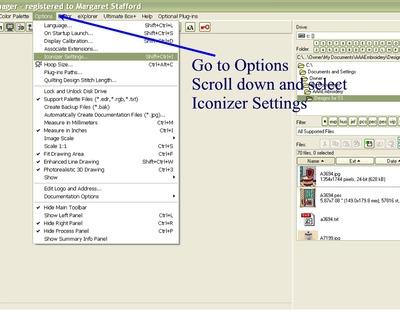
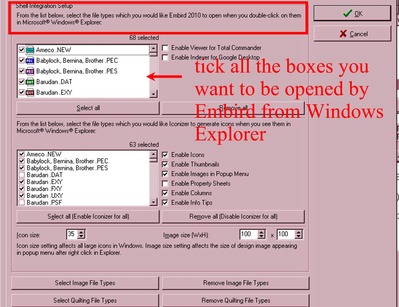
Just go and change the iconizer settings from Manager, Options. That should solve your problem.
1 comment
I can set the settings the way I want, as soon as I have clicked OK all setting are back to their default settings, no matter how often I try to set them as I want them.

2109✽
I had this problem when I installed Embird 2010. Try In Manager/Options/Iconizer settings to uncheck all the boxes that refer to image files e.g.BMP, Gif, Jpeg etc. I still have explorer crashing occasionally, but I have learned to put up with it if I want to use Embird. I must admit though that I still have not upgraded to the newer version because I do n't want any more problems.Regards Suet
2 comments
looks like Meganne beat me to it!
I have many tutorials I've already created for others and it seems the same problems come up again and again. So I have a special folder for problems now. :-)))
122866✽
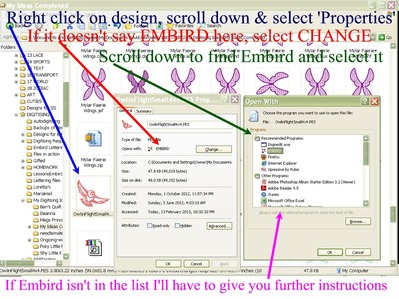
Or you can got to Windows Explorer find a jpeg image file, right click on it and open Properties, If it says Embird (red arrow) click on the 'change' button
then from the next box select the program you WANT to open jpeg images;
if the program you want isn't in the list, select Browse,
go to c: drive\ Program files folder search until you find the program, click on the program to open the files, find the
(name of program).EXE file and select that.
The instructions on the photo below is for the opposite problem ---- when you want Embird to control a selection and it isn't.
then from the next box select the program you WANT to open jpeg images;
if the program you want isn't in the list, select Browse,
go to c: drive\ Program files folder search until you find the program, click on the program to open the files, find the
(name of program).EXE file and select that.
The instructions on the photo below is for the opposite problem ---- when you want Embird to control a selection and it isn't.
1 comment
PS, you can double click on these images to enlarge them.
Hugs, Meg
Hugs, Meg
140728✽
Thanks to all of you for offering advice.
I'm wishing I'd never started trying to put this right. Lots of attempts and three system restores later, I am in a worse position than before as Embird doesn't even work properly now. I'm giving up for today. Luckily, it is still working on my laptop,
I'm wishing I'd never started trying to put this right. Lots of attempts and three system restores later, I am in a worse position than before as Embird doesn't even work properly now. I'm giving up for today. Luckily, it is still working on my laptop,

46645✽
by
sandralochran
16 Feb 2013
+4✽
That happens to mr on my 64bits computer When i open a design .window exsplorer closes down .thus i need to use my laptop that has 32 bits

145308✽
Have you looked at Iconiser settings. That causes great problems for me since the last few updates. Every photo is said to be an Embird file and 'open as' does not work, I get an error message and have to start a photo programme first and open the files there. Highly inconvenient and irritating.
I think we'll have to report the problem to Embird, they are usually very helpful.
I think we'll have to report the problem to Embird, they are usually very helpful.
3 comments
Thats pretty much what we've had. We tried to change to iconizer settings, but they change back when I'm not looking! i'm going to ask Embird now.
The best thing would be to report it to Dusan Balara at Embird.
Lillian is also having problems but only with her pes designs and I have heard of others having problems with changes in iconizer not saving.
Sue, you should not have had to do system restores because of the problem you mentioned.
I am soooooooo glad I decided NOT to purchase the current upgrade as they seem to have created more problems than they have fixes, from the upgrade to purchase up to and including the builds that have followed.
My suggestion, Completely remove the current version, (making note of your new licence if it was different to the older version as some apparently were).
And go back to the previous release:::
Embird 2010 build 8.8 D
Hopefully you kept copies of your old license numbers and also the program files you downloaded previously, if not , you'll find the older versions at the link below:
http://www.embird.net/sw/embird/oldfiles.htm
http:// www. embird. net/sw/embird/oldfiles. htm
I added a second URL with some spaces added in case the first one doesn't work.
If you didn't keep copies of your previous licenses you should contact the Balara's directly and ask them to supply them to you, after you tell them you intend to uninstall the latest version and tell them the reasons why.
The more people who write and advise them of the problems the sooner they will be fixed.
Hugs, Meg
Lillian is also having problems but only with her pes designs and I have heard of others having problems with changes in iconizer not saving.
Sue, you should not have had to do system restores because of the problem you mentioned.
I am soooooooo glad I decided NOT to purchase the current upgrade as they seem to have created more problems than they have fixes, from the upgrade to purchase up to and including the builds that have followed.
My suggestion, Completely remove the current version, (making note of your new licence if it was different to the older version as some apparently were).
And go back to the previous release:::
Embird 2010 build 8.8 D
Hopefully you kept copies of your old license numbers and also the program files you downloaded previously, if not , you'll find the older versions at the link below:
http://www.embird.net/sw/embird/oldfiles.htm
http:// www. embird. net/sw/embird/oldfiles. htm
I added a second URL with some spaces added in case the first one doesn't work.
If you didn't keep copies of your previous licenses you should contact the Balara's directly and ask them to supply them to you, after you tell them you intend to uninstall the latest version and tell them the reasons why.
The more people who write and advise them of the problems the sooner they will be fixed.
Hugs, Meg
Thanks - I sent them an email this morning so I'm waiting patiently for a response.

255066✽
Sue, I am afraid that I cannot help you at all. Hope you come right soon with the help offered. It is enough to drive one mad when this sort of thing happens. Sarah.
140728✽
Success - I gritted my teeth and uninstalled and deleted all traces of Embird. A few minutes to download again and reinstall and eveything is working perfectly. I wish I'd done this in the first place!
1 comment
So glad you got it working again!