








122✽
Embird Software Question - Density - I created/digtized a applique and then wanted to resize it - however when resized it the density changed and I has empty spaces so it looks spotty.
1 images:
[1]

Comments (5)

145307✽
If you digitised it yourself it is best to resize it in Studio, that way your density will stay the same.
In Editor make sure you enlarge and keep the density constant 4 - 4.5 gives a nice satin / column stitch.
In Editor make sure you enlarge and keep the density constant 4 - 4.5 gives a nice satin / column stitch.
145307✽
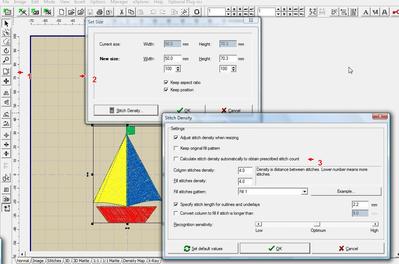
When you resize in Editor don't enlarge the square around the design - in that case the stitch count stays the same. Instead click the resize symbol (1) in the left hand column. You'll get a pop-up (2), where you set the required size, then click stitch density (lower left) which brings you to another menu. Make sure (3) is unchecked and set the required density. You'll see that the stitch count will increase and your satin stitch should look even.
78119✽
1307✽
by
grannieannie
18 May 2013
+1✽
Thanks for this information. I plan on getting the software before I retire next year. Grannieannie
48✽
Thanks for this insight! I couldn't get it figured out either.