








360672✽
You guys said i could enlarge a cross stitch design*****So i tried this one and look(:(?????It don't work????Well what do u say now????hugsCarolyn
3 images:
[1]

[2]

[3]

Comments (11)

24826✽
by
mranderson
08 Jul 2013
+4✽
Hi Carolyn. I was NOT one who said you could enlaarge a cross stitch design sooooooooooo that lets me off the hook. heeheehee. Hugs Marg
3 comments
Me too. You never know until you try it for yourself. Maybe you enlarged it tooooo much?
You must make sure you do not change the number of stitches and then you'll be OK.
i will try and let u all know ok hugs

89895✽
Interesting look. Wonder what happens if you decrease the size? Can you salvage that piece with all over stipple and new designs on top?
1 comment
nawwwwwww its in our dump now hugs

86901✽
by
highlandermom
08 Jul 2013
+3✽
Very interesting super size.
1 comment
lol u know i half to try right????

5822✽
by
baldacchino
08 Jul 2013
+4✽
We all do one of those once a year, use it to line a pillow with OR give it to some one you don't like ???
1 comment
lol its in the dump

15711✽
I always understood you COULD NOT enlarge cross stitch!
1 comment
lol i think we can

140726✽
How much did you enlarge it?
1 comment
not very much but i did it wrong Mops said ,i will try again ok
6252✽
thanks for letting us know - I will try and remember not to alter any cross-stitch design
1 comment
i will try again and see if i can get it right ok

21222✽
I have not yet made any cross stitch designs on my emb machine, but thanks for the warning, I will keep it in mind. Will it be difficult to unpick? Hugs
1 comment
i threw it in the dump lol

145307✽
I said you could and I did, but I also said you should keep the stitch count the same. I resized in Embird, but as I know you have 5D, here's how to do it.
I resized a design I made 2 ways and only one will work.
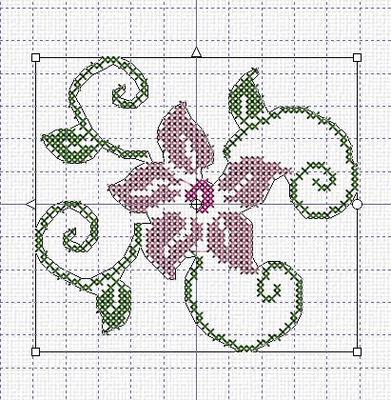
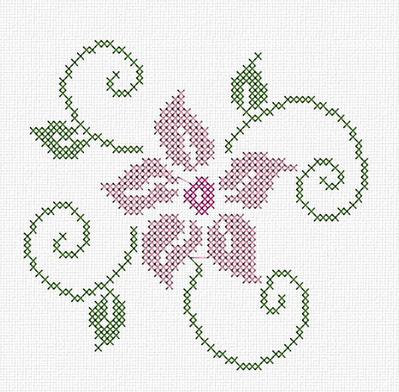
When you load the design in 5D (extra) it has white handles - see picture 1. Enlarge the design by dragging the handles and the stitch count will be the same and it looks great - see pict 2.
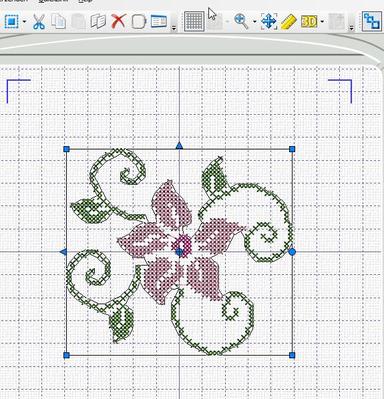
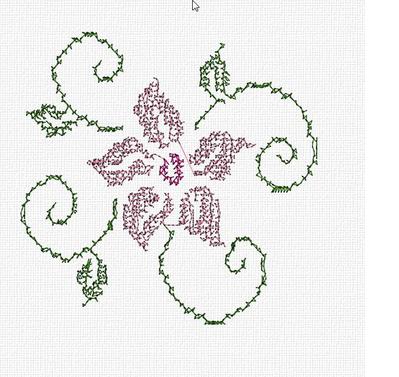
Do NOT use the resize icon - see picture 3 - you'll get blue handles and the density will be corrected. In this case enlarging it gave fewer stitches and the result is horrible - as it shows in picture 4.
From your pictures I think you used the last method.
I resized a design I made 2 ways and only one will work.
When you load the design in 5D (extra) it has white handles - see picture 1. Enlarge the design by dragging the handles and the stitch count will be the same and it looks great - see pict 2.
Do NOT use the resize icon - see picture 3 - you'll get blue handles and the density will be corrected. In this case enlarging it gave fewer stitches and the result is horrible - as it shows in picture 4.
From your pictures I think you used the last method.
4 comments
yes i did use re-size and the blue handles i will try again thank-you:):)Will let u know what happens hugs
I'm glad that is sorted. Thanks, Martine.
The proper terminology is 'scale' for method 1 (keeping the stitch count the same) and 'resize' for method 2 (keeping the density stable). But not every software uses 'scale' (Embird calls both resize - 5D uses both terms). So to be precise: you can scale cross stitch designs and not resize them.
thank you :)

743363✽
sorry it didn't work out well. Thanks for trying and the explanation of Martine.
1 comment
yes i will try it yet today

299709✽
ah that is a shame, but this is also how we learn so thanks for the lesson. hugs Loralye