








255066✽
I feel a bit dumb even asking this question. Since having my new machine with it's larger hoop, I have been a bit scared of writing larger script. My question is - to get the script in within the length of the hoop I must set it up sideways? Does that make any sense at all??
Comments (5)

30988✽
I have not done this myself and i am sure you will get better advice, but what you say will work but you will get less legnth on the design, if you look in the your book can you put the letters any closer together. by having less space between each letter..
hugs Pam.
hugs Pam.

33986✽
Sarah I'm not sure if I understand your question right.
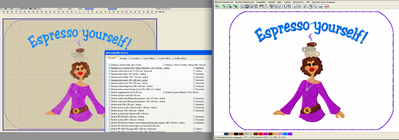
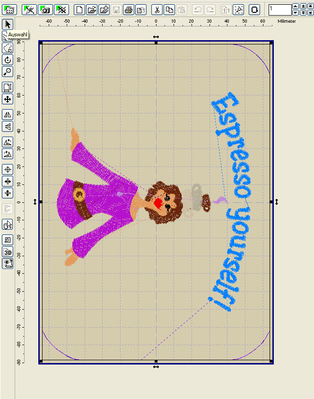
If I use a larger font then I choose the hoop-position horizontol in embird. After finishing the design I twist it back to vertical (inlc. the design). In embird it's better to have the bottom of the design at the left side so you can see the correct pic. At the bottom you see how the design is saved. Hope this helps you :o)
Greetings, Bettina
If I use a larger font then I choose the hoop-position horizontol in embird. After finishing the design I twist it back to vertical (inlc. the design). In embird it's better to have the bottom of the design at the left side so you can see the correct pic. At the bottom you see how the design is saved. Hope this helps you :o)
Greetings, Bettina
3 comments
This how I do it too. Change it to horizontal then add the text then put it back to vertical so it will sew correctly.
This is how I do it too. My machine automatically reverts back to the normal upright position after each design. Just be sure to view your design to make sure that the whole design is correctly oriented and not just the text. If you don't trust yourself, try stitching something on a scrap.

mine shows up just the way it sews out, but I love the design Esppresso yourself Bettina! hugs Loralye

8230✽
Yes, I understand what you mean as I have to do that with some of the larger designs. Just be very careful when hooping or your letters might turn out upside down or backwards!!Ask me how I know!!

173695✽
So you are talking about at the machine and not in any software, if that is the case there should be a preview button.
255066✽
I obviously made myself much clearer than I thought. You have all answered my question - now I just have to try it out. *** 4 all you helpful Cuties. Thanks. Sarah.