






109900✽
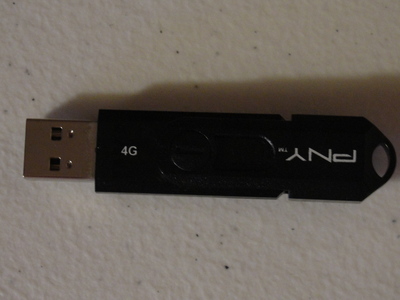
I have been thinking,as I organize my room, I need to start cleaning/clearing my pc.Okay,call this my 'senior moment' for the day,and I hope just this one (LOL) but is a flash drive and a UB stick the same thing? Can I put my emb design files on this,instead of so many CDs ? Then can I delete them off my pc? Is this what I use? If so,will it hold more than a CD?
1 images:
[1]
Today's free design

A free embroidery design every day
Cute Embroidery gives away one design every day, and the community votes for tomorrow's.
Comments (19)

19282✽
Not sure if a flash drive and a UB stick are the same thing. I know that you can store your emb. patterns on this flash drive. The GB. determine how many you can put on one. I use these, but I have the 8GB.
3074✽
Yes they are the same! Putting my designs on my USB has allowed me to free up space and allowed me to make my designs portable. USB's come in different sizes and although you may think it would be better
to get the larger memory- your machine has to work harder to find the designs so I have found to keep designs I am using on a drive with less memory however if your machine does not have a port for the USB drive the larger memory is great. I now use a combination where I keep designs I am currently using on one drive and the bulk of my designs on another drive. Hope this helps and what does everyone else do?
to get the larger memory- your machine has to work harder to find the designs so I have found to keep designs I am using on a drive with less memory however if your machine does not have a port for the USB drive the larger memory is great. I now use a combination where I keep designs I am currently using on one drive and the bulk of my designs on another drive. Hope this helps and what does everyone else do?
984✽
Hello, yes that is exactly what you should do place your designs on the USB/memory stick and they hold A LOT of designs...I had a few 8gb usb sticks as I've been collecting designs a long time but never could find the design I wanted when I wanted it ( no, I am not organized! bite your tongue lol) so husband got me a 128gb usb stick for Christmas and I do believe that should hold all of them --for now. Just to organize them all...I used to burn them to CD's but have learned that sometimes the information on a CD dissolves never to be retrieved...and , if you change computers or devices that read the CD's the new reader might not understand the language , if you will, of the old CD....so for now if you don't store information on a "cloud" then use the USB/memory stick. Learned all that from my adult children who work in the computer field... Happy stitching.

5347✽
IMHO, don't put all your trust in the flash drive, they break and you would not want to lose all your designs. I back up new designs weekly to a portable hard drive and the whole shebang twice a year to CDs, My sister has copies of the CDs just in case of a fire. Over kill maybe, but like most of us there are too many designs I couldn't replace. I'm seriously thinking about something like Carbonite.

57675✽
Yes, they are the same. Common names include: Flash Drive, USB Stick, Memory Stick, Keydrive (used with the expensive embroidery software -- as a key), Pendrive, Thumbdrive and Jumpdrive or simply USB. The one you show is 4 gigabytes. A CD will only hold 700 megabytes of data. So your Flash Drive will hold a lot more than one CD.
Why do you want to remove the files from your PC? They are relatively small files. You should always have your files (any that you want to keep) in two or more separate places. The Flash Drives are good to take with you -- but they are prone to fail. Carbonite and other online back-up services work well. However, they do take up system resources and may slow down your computer depending on your internet speed and other variables.
Why do you want to remove the files from your PC? They are relatively small files. You should always have your files (any that you want to keep) in two or more separate places. The Flash Drives are good to take with you -- but they are prone to fail. Carbonite and other online back-up services work well. However, they do take up system resources and may slow down your computer depending on your internet speed and other variables.

743373✽
yes you can, but I suggest you make a back up too on PC or external harddrive In case the usb/ flashdrive crashes ( it happens sometimes)
8230✽
I have started using the sticks almost exclusively. I have one that I use for designs that I purchase and one for freebies. The first thimg I did was set up a file folder with categories so when I download I can put it right into, for example, "dogs" , "cats", etc. n the purchased one I set up a folder for each designer/company ie"Designs by Juju", "Embroidery Library", etc.Recently I got one of the little cards-2GB you put in a digital camera and as it fits right in my compute I just leave it there and download to it. So far that has been good. The best set of folders I found for free one time at stitch fun or Tiny Little Stitches.Will add the links and you can see if they are still available.
2 links:
[1]
http://www.stitchfun.com
www.stitchfun.com
[2]
http://www.tinylittlestitches.com
www.tinylittlestitches.com

145308✽
Yes, they are the same. I've got them from two old 256Mb ones to more recent 8 Gb. Machine reads them all and as long as you have sub-files that are not too big speed of reading is hardly an issue. I save embroidery files in the format my machines can use, one vp3 or vip, another jef.
Since I lost my laptop and with it a number of design files and embroidery files I had not yet saved to my external hard disk (I even had to ask someone for 3 files I had sent her) I back-up daily. And once a year or so save the lot to CDs/DVDs just to make sure. And I now also save my design files as soon as I make them to an USB-stick/flash drive (whatever you call them where you live).
It takes a bit of time, but not as much as re-digitising them!
Since I lost my laptop and with it a number of design files and embroidery files I had not yet saved to my external hard disk (I even had to ask someone for 3 files I had sent her) I back-up daily. And once a year or so save the lot to CDs/DVDs just to make sure. And I now also save my design files as soon as I make them to an USB-stick/flash drive (whatever you call them where you live).
It takes a bit of time, but not as much as re-digitising them!
66927✽
by
graceandham
20 Jan 2014
+6✽
Toogie, Here's my 2 cents worth. I have a Janome 350E and it gets overwhelmed by too much info (plus takes forever to load). I don't put more than around 100 design files (and only my format) on a USB. My local store told me not to exceed 2g USB's, but those are ancient history, along with the 4's. So, I'm up to 8g and so far so good, but I still don't put more than about 100 files on it. Guess I'll be ordering from a specialty shop if 8's go away at Office Depot and Wal-Mart When they put a particular brand on deep discount, I clean them out! Also, you can name the USB or give it a number to make it easier to locate files. Have fun.
11271✽
I am with many of the Cuties. I use a USB/Thumb Drive for transferring designs to my machine - and a limited number on the drive at any one time. I store on my PC and I also backup to an external drive regularly (although probably not as often as I should). I do a DVD backup about once a year and it stays at my Mom's. We have a safe that is suppose to be fire resistant but still.....

44906✽
by
dlonnahawkins
20 Jan 2014
+5✽
I have lived with a computer engineer for 50 years, and he has never suggested that I store my designs on a USB stick, or whatever you are calling it. I was told by our Husquvarna dealer never to put more than 1G into your machine, so I keep the smaller jump drives for transferring from my PC or software to my machine. I put my design files into my PC on a designated drive, and then backed to external drive. USB drives can break, and I have been told repeatedly by DH that they can only be cleared so many times. I do not store anything on my drives that I may want down the road. You have received several responses, so hope it has helped you.
66927✽
by
graceandham
20 Jan 2014
+7✽
Toogie - One more thought., a warning: The more you clean and organize, the more you see of other cleaning and organizing projects. It's like when you get new carpet in a room, it needs paint or the next room;s carpet looks bad or you don't like your cabinets any more. Don't get yourself in an endless loop (as the computer geeks say).
109900✽
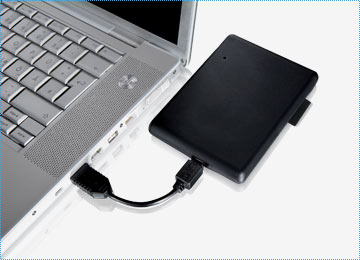
Now I want to know, what is this external hard drive? Does it come on your pc or is this something, a program you install? Sorry I am so pc dumb.
2 comments
It is hardware - it plugs into your computers USB drive (just like your little drives). It should "see" the drive when you plug it in (like it does your little drives). Then you copy your data to it just like you copy to a folder on your computer or to your little drives. It is very user friendly. They have come down in price a bunch - easy to find a good sized one under $100 here in the US.
Not sure where you live, but DH just picked up 1TB plus a 16G jump drive packaged together for about $55...kept it for himself though...He got it at Sam's. I keep my external drives hooked to my PC, and on my desk. I am able to access them as needed. Just safety so that I do not lose anything I want.

234585✽
I'm with beth (dlonnahawkins) My Husqvarna dealer told me never to use anything bigger than 1gb for transferring my designs to the machine. It would take too long to download on anything more. I still have my original 256mb stick, but I use several USB sticks.
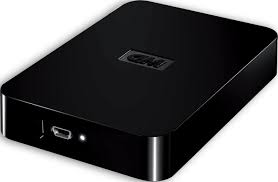
I've put up a picture of an external hard drive. You can buy them from a reputable computer shop. Whichever way you feel comfortable to save them Toogie, it's good to have several back ups incase you do lose some.
Good luck with it all, love and blessings Chris
P.S. For your information I use the second picture Hard Drive it sits at the back of my computer, but as you can see you can attach it to the side if you have side access.
I've put up a picture of an external hard drive. You can buy them from a reputable computer shop. Whichever way you feel comfortable to save them Toogie, it's good to have several back ups incase you do lose some.
Good luck with it all, love and blessings Chris
P.S. For your information I use the second picture Hard Drive it sits at the back of my computer, but as you can see you can attach it to the side if you have side access.

25510✽
Here is what I do... I have a master USB stick that I copy all my designs onto. This is where all my designs are stored incase my computer crashes, which it did a year ago. This USB NEVER goes into my embroidery machine. Have you seen all those USBs that look like cartoon figures and little animals? Well I have a whole collection of those. All of my ITH stuffed animals are stored on a pig. My redwork designs are on a ladybug, etc. These are the USBs I put into my machine. Maybe this will help some in organizing. hugs, Susan
1 comment

can I ask where you got a ladybug USB please

52686✽
by
shirley124
20 Jan 2014
+2✽
I would not suggest removing your Embroidery files from your PC. I have mine on 2 PC's and backed up to a external Hard Drive. I was told a external hard drive is more likely to let you down that your PC. I have also lost damaged (call it what you like) designs on a USB stick I use to transfer designs to the machine. I would not put my trust in then only. Best of luck. Shirley

38558✽
by
blueeyedblonde
20 Jan 2014
+2✽
I use two different external hard drives. I put only emb. files on one and the other one has everything from both by computers - so this way my emb. files are backed up twice.
I have a 64mb usb stick that I got with my old desktop. Lost it for a bit, but now have found it again (was cleaning and that was the only place I hadn't looked for it - lol). I also have a bunch of 1 gb sticks I recently got from dollarama @ $3/ea. One of the dealers where I go to for info and see what new "tools" they have that are a new "must have" - they carry the 1gb usb sticks - which must be a special order as they are $2o/ea. I've always only transferred whatever design I wanted directly from my computer to my machine. I delete it from my machine after I've used it. Sometimes I might have several on it and some might end up not being used for a month - so have never put a lot on it to see just how many it will hold at one time.
I have a 64mb usb stick that I got with my old desktop. Lost it for a bit, but now have found it again (was cleaning and that was the only place I hadn't looked for it - lol). I also have a bunch of 1 gb sticks I recently got from dollarama @ $3/ea. One of the dealers where I go to for info and see what new "tools" they have that are a new "must have" - they carry the 1gb usb sticks - which must be a special order as they are $2o/ea. I've always only transferred whatever design I wanted directly from my computer to my machine. I delete it from my machine after I've used it. Sometimes I might have several on it and some might end up not being used for a month - so have never put a lot on it to see just how many it will hold at one time.

33451✽
by
marjialexa
21 Jan 2014
+1✽
These little drives are convenient, and ONE place to store designs, but they were not made for long term storage, they were developed so you could easily take information with you instead of dragging your whole big laptop. The "little" part is really nice, until you accidentally knock it on the floor and step on it, or pick it up with the sweeper, or get it too close to a magnetic field. Or the dog decides it's a fun chew toy, or the cat bats it into the heat register. First, designs really don't take up that much room on your computer, leave them there. Do a quick back up to a flash drive if you want, but then also back up to DVD's (not CD's) because they hold so many more designs. Any medium can fail, including an external hard drive, so back up in several places. DVD's are so cheap now, if you're afraid a copy will go bad, just make two at the same time. Better take up a little room with backups that sit there crying over thousands of dollars of lost designs. Just make at least two different types of backups, don't trust those flash drives entirely, it's such a lot to lose in so little a space. Hugs, Marji
1 comment
Good Job, Marji

255066✽
Questions are always good. That is how we learn no matter how old we are. I see you have lots of answers. hugs Sarah.