












 1821✽
1821✽
I'm not sure this is in the correct category. But I need to know what format, size, etc. you all put your photos in to upload them. I decided to try uploading one of my projects, but it sits for over an hour without uploading. What am I doing wrong?
Comments (6)
 109971✽
by
crafter2243
24 Jan 2014
+6✽
These are the things I know that work.
Jpeg format
less then 500 kb
and not using explorer to upload but use google chrome or firefox
Good luck
Jpeg format
less then 500 kb
and not using explorer to upload but use google chrome or firefox
Good luck
3 comments
Thanks for your answer. Does Explorer simply not work to upload, or do you mean that you haven't used it?

When Internet Explorer did the last upgrade it did something to the photo loading, so Chrome or Firefox will get you fixed right up.
Thank you, I just saw this posted to someone else & think this could be my problem. I'm now downloading Google Chrome & will give it a try. I had even down-sized my photos 4 times, thinking it was a size issue, but nothing helped. Thanks again. I'm learning!
 234609✽
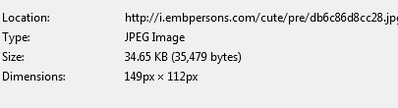
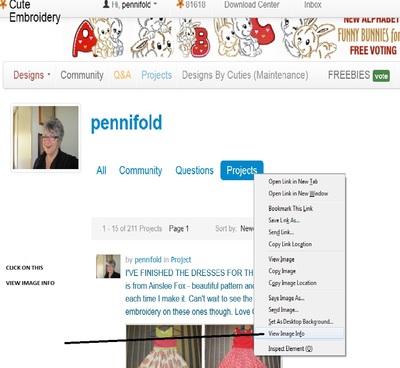
Hi Jonesy, I've posted a couple of pictures to show you where you can locate the size of the picture.
In mine it shows the size of jpeg as 34.65 - that size is for the green and pink dress I made for Aqualina.
I suggest you go have a look at a PROJECT PICTURE right click on the picture and down the bottom it says VIEW IMAGE INFO click on that and a page will come up like the one below giving you the dimensions etc. I hope this will help you out. Some of mine are bigger than this size, and some smaller. If you are still having trouble try making the images smaller. Good luck love Chris, Newcastle, Australia
In mine it shows the size of jpeg as 34.65 - that size is for the green and pink dress I made for Aqualina.
I suggest you go have a look at a PROJECT PICTURE right click on the picture and down the bottom it says VIEW IMAGE INFO click on that and a page will come up like the one below giving you the dimensions etc. I hope this will help you out. Some of mine are bigger than this size, and some smaller. If you are still having trouble try making the images smaller. Good luck love Chris, Newcastle, Australia
2 comments
Thanks, Chris. I think the problem is that I was using Internet Explorer, so I'm downloading Google Chrome & will try with it.
Thanks for replying "jonesy" - glad you have downloaded Google Chrome - hope that was the only issue. Love Chris
 24826✽
by
mranderson
24 Jan 2014
+3✽
This sounds crazy but what I do is send the photo to myself in an email as an attachment then when I get the email I save the attachment back to my pictures folder then upload them to projects.
When I send them to myself as an attachment they download in a size suitable for email. Hope this makes sense. Hugs marg
When I send them to myself as an attachment they download in a size suitable for email. Hope this makes sense. Hugs marg
 140729✽
I resize my pictures (jpg) to less than 1500 in either direction and use google chrome.
Good luck!
Good luck!
 255070✽
When I post a project I just change my camera setting to e mail. Sarah.
 743381✽
I saw you've got some answers already. I always used Explorer (still do) but when I have to upload a picture I do have to use Chrome: explorer does not work on this site anymore with uploads, even if it's a small size and Jpg.