












 145309✽
Embird redwork question.
I got a PM with this question from someone who wants to remain unknown.
quote
When I do lineart, I use Embird's single stitch for the outlines, with a backward path, so the design stitches twice. Carolyn Keber says this is not redwork.
What do I call a design like this? Lineart?
And what do I have to do to call it redwork? Do I use Embird's redwork stitch for the second line, and single stitch for the first line?
I have a design that was manually digized. It does not matter what I do, one line (only one!) refuses to stitch perfectly on top of the first. I always create the second line using Embird's "create backward path" function. I can not seem to fix it. I deleted the line and recreated it multiple times, nothing will fix it.
When I started digitizing, I asked Carolyn Keber about it, and send her my eof file. She said there was nothing wrong, but if I stitch it in jef on my Elna 8600, the line is visibly double.
Do you have any idea as to what may cause it and how I can fix it?
unquote
I don't know why you can't call a double run Redwork. What I do know is that you want it to stitch out without jumps - unless there are loose elements to the design of course.
Using a backward path usually does not give a good result. So I use the "arrange outline parts". That works well. It even lets you set the parameters and after combining does the forward parts in single stitch and the backward ones in the chosen stitch. You get a continuous run going over all parts twice.
Embird offers a so-called redwork stitch - it stitches each stitch 5 times - and has a default setting of 3.5 mm;the single stitch is default 2.0; the triple stitch 2.5. You can even use sketch or satin stitch and the arrange outlines tool works for those as well.
Experiment with a simple design, like the leaf I show in the pictures. Just make sure the three leaves have a node in common - in this case where the stems touch. Copy the parts before you combine them, give each their own parameters, use "arrange outlines" (the "tree") - the last picture shows what the software has done when I used the "tree" - stitch it out, write the settings you used on it and keep it in your personal reference bible.
Tests like that are not a waste of time and material, on the contrary they are a very effective way to get to grips with your software.
As for the one line you are talking about - did you have a look in Studio and make sure the nodes were touching (use "snap to nearest node)?


 234609✽
Love and blessings to you too. Martine
 45918✽
 169079✽
 158720✽
776✽
158720✽
776✽
If I want it to look more authentically like redwork I use the redwork choice in Embird. I usually lengthen the stitches a bit, but that is just my preference. I have seen various styles of hand stitched redwork so I am sure that using various styles with machine outlines is just as workable.
Linda V
 140729✽
145309✽
140729✽
145309✽
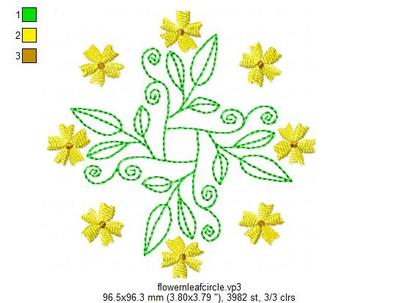
I could not resist playing with that simple shape and added a couple of spirals and a few flowers.
For the Embird users: put the .eof-file of things like flowers and leaves you might use more often in Embird32 or Embird 64 / Studio/ Library and create a new category and save it there. You can open it in Studio whenever you are digitising.
 11271✽
 3597✽
3597✽
 261164✽
Again, I wish I had embird just to be able to utilize your tutorials!
I have the (expensive) 6D Premium, but for digitising I prefer (the so much cheaper) Embird. Other parts I use to a certain extend and I would not really like to be without it.
You know I love some of the features of Artista, ever since I came to be aware of the ripple stitch. And Brother's PE has a nice spiral that could be useful. But I spent enough on s.w. as it is and can do most things I want to do. Too old to be employed anywhere.
 57675✽
Thank you for the wonderful tutorial I will keep it -- as I am saving for my next software purchase. This information will be useful to me no matter the software I use.
8040✽
Thanks for all the time you spend in creating tutorials! I just laughed myself into an asthma attack reading your comment to Sue not to encourage questions.
We are all (well, a lot of us!) picking up a lot of things from these little tutorials.
Keep up the good work!
Anneliese
66947✽