24✽
I am new to downloading designs, saving them and then using them. I am also not great on the computer.
I was trying to get a download from Cute Embroidery so I clicked on download, then chose PES, then I get a computer question asking where or how I will get it. I don't know the answer. I have a Samsung computer. I do see a place in where I can store photos that has a PES library (that currently has nothing in it) I thought that might be the place but I don't know how to get it there. I am sure some of you out there could help me. It should not be this hard.
Thanks, Kathy
Comments (7)

57675✽
Welcome to Cute Embroidery!
It would be helpful if you could answer what version of Windows you have. For all computers, you can create a Folder and add all designs there. However, I would recommend that you make a Folder and then Folders inside that to organize the files.
The attached link might help you get started.
It would be helpful if you could answer what version of Windows you have. For all computers, you can create a Folder and add all designs there. However, I would recommend that you make a Folder and then Folders inside that to organize the files.
The attached link might help you get started.
1 links:
[1]
http://www.wikihow.com/choose-where-a-download-is-saved
www.wikihow.com
2 comments
I think we were typing simultaneously!
Yes, we must have been. I like your picture!

140723✽
Welcome to Cute!
You really are starting from scratch aren't you?
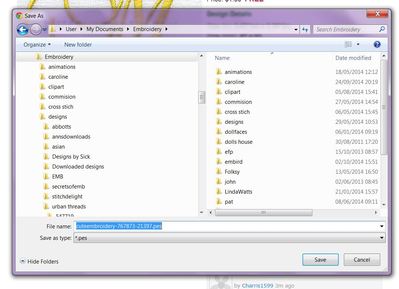
It would help if you tell us which version of windows you are using. I use Windows 7. When I click on the PES tab below the free design I get a dialogue box like this one. Is this what you see?
You really are starting from scratch aren't you?
It would help if you tell us which version of windows you are using. I use Windows 7. When I click on the PES tab below the free design I get a dialogue box like this one. Is this what you see?
1 comment
I have windows 8

11795✽
by
americangirl
10 Oct 2014
+5✽
I set up folders to organize them in and save them there. It isn't hard, it just takes a little time to figure it out. I name all the folders. Example if it is a font, I name it the name of the font and the site where it came from. Hope this helps. Good Luck!!
1 comment
Some folk arrange by site, others by topic (animals- birds, animals - dogs). I was trying to switch over, so I have a combination of both, which makes for lots of folders. Sites that are really great digitizing, I store all those by site name - except Cute which would be a really huge folder! Don't just download aimlessly or in six months ou won't be able to find what you know you have. Have fun.
318615✽
by
dragonflyer
10 Oct 2014
+5✽
Welcome to Cute...I see you have a start to your question being answered...the version of Windows as indicated by Spendlove and Rescuer would certainly help complete the answer...and you are working on a computer and not a tablet??? There is a difference sometimes in how the saving of files works..
1 comment
I am on a computer and using windows 8

234568✽
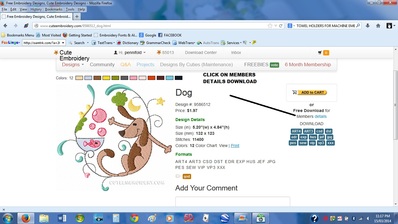
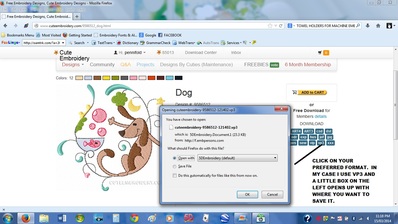
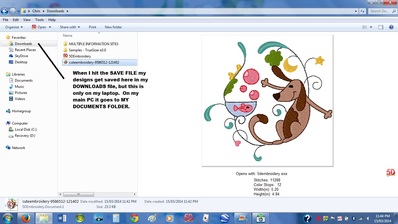
Hi Kathy and welcome to this great site. I've put some pictures in of how I download designs. I am assuming that you have paid for a membership, because if you are all you need to do is click on the PICTURE only - DO NOT CLICK ON ADD TO CART - I do not have Windows 8, I have 7. You should still be able to get the idea. Love and blessings Chris, Newcastle, Australia.
1 links:
[1]
HOW TO USE FILING FOLDERS FOR MACHINE EMBROIDERY DESIGNS
www.artisticthreadworks.com
66927✽
by
graceandham
11 Oct 2014
0✽
One more thought - if you even think you might possibly add a machine of another brand, start collecting those downloads, too. I have a "home" machine Janome and a commercial Babylock. Really glad I started collecting both.

255063✽
Welcome to Cute - I see you have loads of answers. Just a warning this site is very addictive!!