













36✽
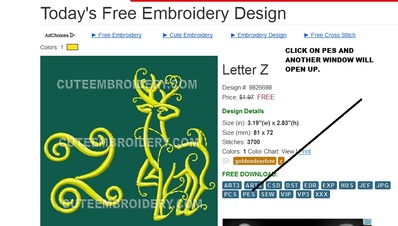
I bought a brother sewing/embroidery machine. My prob is I don't know what three letters to pick to get the free design and then how to open them because when I try to save it it wants to know how I want to open it. Then I need to know how to get it to my sewing machine
Comments (12)
1821✽
by
CymbleneJones
21 Nov 2014
+7✽
If you have a Brother machine, you would use the pes format designs.

234580✽
Good morning TCDEX I- I'll show you how to do it.
1. Click on the PES tab.
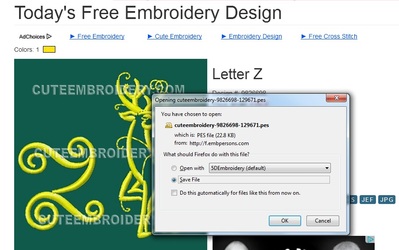
2. Another window will open up with the little OPENING CUTEMEBROIDERY AND THE NUMBER OF THE DESIGN. As you cans see I use the 5D software programme which I have due to having a Husqvarna sewing machine and a Brother Sewing machine - so I highlight the SAVE FILE - and it will download it for me into my DOWNLOADS folder. If I want to change it at this point I HIGHLIGHT the OPEN WITH option and it will open directly into my 5D programme. I can't show you that at the moment because my DONGLE which runs my programme is broken and I've ordered a new one.
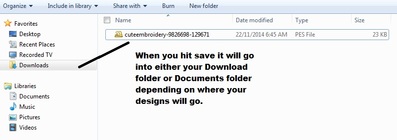
3. I've shown you where my downloaded designs go to and they go into my DOWNLOADS tab. You can change where you want it to go, sometimes I save them in my DOCUMENTS FOLDER.
I hope this is of help. If not, keep on asking, because there will always be someone on here to show you. Love and blessings Chris, Newcastle, Australia.
P.S. Where are you from?
1. Click on the PES tab.
2. Another window will open up with the little OPENING CUTEMEBROIDERY AND THE NUMBER OF THE DESIGN. As you cans see I use the 5D software programme which I have due to having a Husqvarna sewing machine and a Brother Sewing machine - so I highlight the SAVE FILE - and it will download it for me into my DOWNLOADS folder. If I want to change it at this point I HIGHLIGHT the OPEN WITH option and it will open directly into my 5D programme. I can't show you that at the moment because my DONGLE which runs my programme is broken and I've ordered a new one.
3. I've shown you where my downloaded designs go to and they go into my DOWNLOADS tab. You can change where you want it to go, sometimes I save them in my DOCUMENTS FOLDER.
I hope this is of help. If not, keep on asking, because there will always be someone on here to show you. Love and blessings Chris, Newcastle, Australia.
P.S. Where are you from?
234580✽
Forgot to welcome you to this wonderful site - a big Aussie welcome from me. Love Chris


24826✽
by
mranderson
21 Nov 2014
+5✽
I am not very computer savvy but you will need WinRAR or similar to open the file. Others may have a different program that they can recommend. Welcome. Hugs Marg
1 comment
You won't need this and only need that program for.rar files.
234580✽
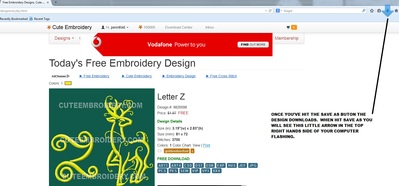
I forgot to add this picture - once you've SAVED AS or OPEN WITH - you will see that BLUE OR GREEN ARROW flash and it is saved to your computer. In my instance I have them saved in my DOWNLOADS folder.
Good luck, love Chris
Good luck, love Chris

57675✽
I can right click a design file and send it to my embroidery machine because mine is connected with a USB cord. If your embroidery machine does not have a USB cord it might have a USB Drive that's how you would get it to your machine in that case. You do not need any special software in order to do this. The reason I have software is so that I can see the file before I send it to my machine.
1 comment
Welcome to Cute!
318641✽
by
dragonflyer
22 Nov 2014
+4✽
I see your question has been answered..big welcome to Cute...

145792✽
congratulations on your new machine and welcome to cute. You can already see what an asset Cute can be for you. We are proud to have you with us. what you do not know, just ask and someone will be along sooner or later that will try to help you/Lillian

20463✽
congrats to you new machine and WECLOME to cute, you will find lots of good info here, my brother came with PE Lite Software a card reader and an usb-stick to transfer the files from the computer to the machine. how does your equipment look? hope you let us know how you get along
9026✽
by
robertahilde
24 Nov 2014
+1✽
Hi,
in Google type: "Brother .....(model of machine) User Manual"
and you will find many websites offering the manual for download.
If everything fail go to Brother website e click the tab "support"
I'm using Innovis 900 for years and happy to help.
All the best,
Roberta
in Google type: "Brother .....(model of machine) User Manual"
and you will find many websites offering the manual for download.
If everything fail go to Brother website e click the tab "support"
I'm using Innovis 900 for years and happy to help.
All the best,
Roberta

11329✽
by
debswebster
24 Nov 2014
+1✽
Download PES for your machine. Sounds like you should be able to go for free lessons from the dealer you bought the machine from. The whole thing can be very confusing at first and you will find it terribly difficult to understand the various stages unless you know how to use the equipment. Good luck and a big Welcome to Cute !!

59631✽
by
hightechgrammy
24 Nov 2014
0✽
If you use a Mac computer, I can give you those directions.... Welcome to Cute!