












26316✽
Trying to put a picture on Cuties but don't know what I'm doing, if this works this is a recent picture of my Son and his new wife.
Today's free design

A free embroidery design every day
Cute Embroidery gives away one design every day, and the community votes for tomorrow's.
Comments (6)

57675✽
57675✽
26316✽
by
juanitadenney
22 Nov 2014
+2✽
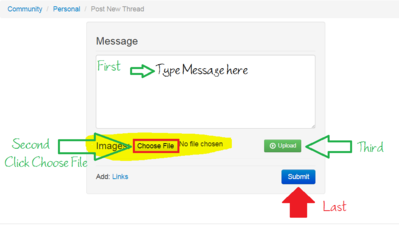
I have tried again and the same thing happened: after I followed the three steps a circle just keeps going around and after waiting what seemed an entirety and nothing happened I just closed out of the page.
1 comment
You can use the "Compatibility settings for Internet Explorer.
Open Internet Explorer and at the top right you will find tools (looks like a gear).
Tap or click the Tools button Tools, and then tap or click Compatibility View settings.
Under Add this website, enter the www.cuteembroidery.com to the list, and then tap or click Add.
Open Internet Explorer and at the top right you will find tools (looks like a gear).
Tap or click the Tools button Tools, and then tap or click Compatibility View settings.
Under Add this website, enter the www.cuteembroidery.com to the list, and then tap or click Add.

109933✽
by
crafter2243
22 Nov 2014
+2✽
If you are using Explorer that might be the problem. Try Google Chrome or Firefox. Also make sure that your picture is in the jpeg format and not to large, I usually downsize it between 200 to 500 KB
57675✽
Were you able to get it figured out?
I added instructions in reply to your comment.
I added instructions in reply to your comment.

145792✽
The circle going round and round is how it use to be with me'till I realized I had to reduce the size of the pic. Don't know about Kb but pixels is what I look at when reducing the size./Lillian