








30656✽
Happy New Year Cuties:
I have a suggestion for those that save Fonts. I have almost 2000 saved, so what I do is save the letter A in a separate folder, with the name of the font and convert them all to jpgs. This way if I am looking for a special font, I can go to the folder and find what I am looking for.
1 images:
[1]

Comments (22)

115784✽
by
asterixsew
06 Jan 2015
+8✽
Thanks for the idea and one I will look into as my collection is not perfect. I don't think I have as many as you do =
1 comment
Your welcome. I have collecting them for nearly 20 years...lol
15626✽
Great Idea.
1 comment
Thank you, I hope it helps others to organize and be able to find a certain font when needed.

109878✽
Now what a brilliant idea! I would also have to add the cd/stick its on-lol- Never too much info for me.-lol This is a great tip. Thank you
4 comments
ps. Sorry, I am not sure how to convert to jpgs, though.
I have SewWhat Pro program and it allows me to convert designs to jpgs or any other format in seconds. I just save the designs in a separate folder and then do a batch convert. SewWhat Pro is a great program and is so reasonable. Its all I need for my embroidery. This is the link to the site and you can try any of their software for 30 days.
Thank you
1821✽
by
CymbleneJones
06 Jan 2015
+8✽
Great idea that I plan to use as well. Thanks.
1 comment
Your welcome.
1744✽
Great idea! I save my fonts by size. I like you're idea. It sure beats opening every folder to see what the font is, even if it is the size I'm looking for! Thanks for sharing.
1 comment
Your welcome. It has saved me hours of time, when looking for a special font and also helps to not repeat a font set.
3385✽
Oh this is a great idea!!! Now to figure out how to do it...HA!!! I have always put the size of the font at the beginning of the name so all the same size are together, but I really like this much better! Thank you so much!!!
1 comment
Your welcome. I just save the letter A of each font, in a separate folder and then with my software (SewWhat Pro) I can convert the design to a jpg.

64451✽
Hi Jerri,
thanks for the great tip. I am currently working on sorting files, purchased the embroidery deduper software from Grams workshop and it is great. Deleting all duplicate files and then will start sorting. Great idea for the alpha, I loose so much time looking through each file although it is easier now that I have purcahsed the font engine from embird. I have decided thst 2015 should be an organizational year for me.
thanks again my friend, and wishing you a terrific 2015.
big hug
Michelle
thanks for the great tip. I am currently working on sorting files, purchased the embroidery deduper software from Grams workshop and it is great. Deleting all duplicate files and then will start sorting. Great idea for the alpha, I loose so much time looking through each file although it is easier now that I have purcahsed the font engine from embird. I have decided thst 2015 should be an organizational year for me.
thanks again my friend, and wishing you a terrific 2015.
big hug
Michelle
3 comments
Be careful with software that deletes duplicates. I don't think it can tell the difference between different designs with the same name. So for example, it would likely delete different designs all named cat.pes even if they are not the same design.
Hi Michelle: Your welcome. I have a lot of duplicates also, but keep both, just in case one is better than the other. I have SewWhat Pro software and it does everything I need for my embroidery. Converts a whole folder in seconds. Wishing you and your family the best for 2015. I know last year had its struggles for us both, but better days ahead..right!!! Hugs back.
Thanks Rescuer. I keep all duplicates in case one is better digitized than the other...doesn't take up too much space and better to have two than one bad one...

57675✽
One day I hope to be organized like you are but until then, I will give you flowers. You have a great idea there Jerri
1 comment
Thank you my dear friend. I started doing this years ago, so now just add new ones as I download them. Hope you are doing well, and all the best for 2015..hugs

169064✽
Great idea and thanks for sharing.
1 comment
Your welcome...
318615✽
by
dragonflyer
06 Jan 2015
+6✽
Alas, to be that organized....
1 comment
I started it years ago and now just add new ones.
33641✽
This is a fantastic way to organize fonts! I love it when a website has that kind of organization too. It makes it so much easier to locate what you are looking for.
1 comment
Thank you, it has saved me hours of searching when I need a certain font for something.

52686✽
by
shirley124
06 Jan 2015
+4✽
What a great idea. Well thought out. Hugs
1 comment
Thank you, just figured it was easier to look into one folder than 2000...when I wanted a special font.
24424✽
Now this sounds like a plan! Thanks.
Hugs & **
Hugs & **
1 comment
Your welcome. Hugs and flowers back to you
5157✽
Good tip Thank you.
1 comment
Your Welcome

85867✽
clever! How do you know where the font came from? I mean which web site? Kay
1 comment
I don't worry about where they came from, I just save the letter A of each set. I file all my fonts in one folder, this is just so I can see what they look like if I am needing something special.

360672✽
Way to go Jerri love your idea if only??????hugs as always Carolyn
1 comment
You can do this Carolyn. You have SWP. Just start a folder and add the letter A of each font, then when you are finished, convert them to jpgs.

24826✽
by
mranderson
07 Jan 2015
+3✽
Thank you. Guess what I have been doing?????? I used the Wilcom program. A few hours of work to do but will be worth it in the long run. Hugs Marg
1 comment
Your welcome.
30656✽
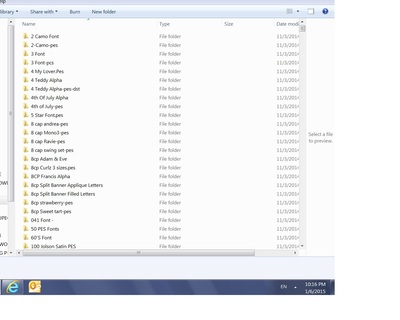
I keep all my font sets in a Master folder and then add the folder with the complete alpha to the master folder.
The picture attached is what my Master Font Folder looks like when I open it up.
The picture attached is what my Master Font Folder looks like when I open it up.
11566✽
What a great idea, I was thinking of embroidering the A in all my alphabets on one piece of material, but your idea is better. Thanks,
Maureen
Maureen
1 comment
Your welcome
45918✽
Sounds like a great idea, will have to look into this thank you. Marian
1 comment
Your welcome.

255063✽
Hi Jerri - I must be a little stupid as I am not really understanding this. I have both SWP and sewiconz which put my alphas in files automatically. I usually rename the files but I can see what is inside the files in an instant.
1 comment
I don't have SewIconz and have been using this method for years. It was just how I started to save my fonts and then when I bought SWP and was able to convert them to jpgs, it made finding a font much easier. I may have to look into Sewiconz, thank you...
170✽
Great idea. Thanks. Actually I've done something like it. I have something I call Master Files with categories, so under font, I put a little abc then the font .
1 comment
Your welcome. Whatever works for you, is a good thing. Just so much easier to find a font when you need one.