








18104✽
Just wondering...is their a way to dl the color charts from Cute Alphabets without printing them?
Thanks so much
Comments (8)

140723✽
There are a couple of ways.
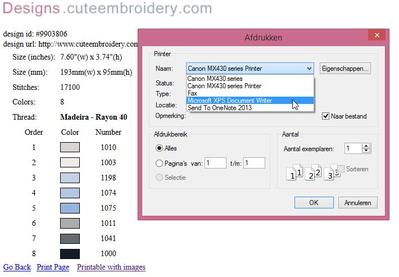
When you click print it takes you to a printable page. When you click print again, a dialogue box will come up. Look for "destination" and click it. Then save as PDF.
If you are using Windows 7 or 8, use the snipping tool to capture the printable page. Save it as the design number.
Hope that helps - sorry I don't have time to add pictures for you at the moment.
When you click print it takes you to a printable page. When you click print again, a dialogue box will come up. Look for "destination" and click it. Then save as PDF.
If you are using Windows 7 or 8, use the snipping tool to capture the printable page. Save it as the design number.
Hope that helps - sorry I don't have time to add pictures for you at the moment.

145307✽
I do the same as spendlove, however, mine does not offer pdf-writer in the destination choices, I use xps-writer. See what your choices are.
18104✽
I am using Foxfire...all I can get is to print...I'll keep looking
2 comments
You do have to select the print option to begin with.
I use Firefox as well.
18104✽
OK this is what I had to do...Copy the print out page save as doc then convert to pdf..WHEW! thank you both...you got me going in the right direction. I would have never got it on my own....POWER to the Cuties!
2 comments
Glad you found a way!
Glad this works for you.
158✽
by
amandasews
21 Jan 2015
+5✽
I use the "print screen" function to do a screen capture, then save it as a .jpg
1 comment

yep that's what I do too

299677✽
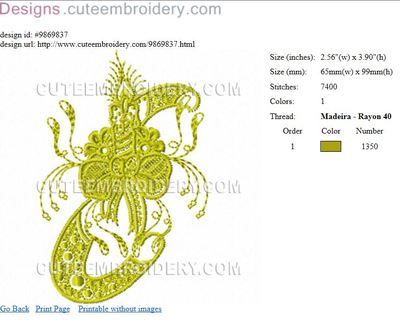
I use the snipping tool that came with the windows pc then I do the same as below & capture the jpeg & save to the same file as the embroidery
1 comment
you can also make this smaller or larger if you wanted too

52686✽
by
shirley124
21 Jan 2015
+2✽
I click on Print then Click File at top left of page and go save as. I the open the page and highlight page and copy and then paste it to a word file.
18104✽
thank you alllllll!!!!!
1 comment
It is what we do!