








13243✽
Just a quick question, I have a purchased feltie design and would like to place more than one in the hoop so I can stitch several out at once. I have the janome 350e Do I need to use digitizing software to do this, or can do on the machine?
Comments (8)

234568✽
That is the only way I do it sewmum1. I've got 5D software and use that to copy and paste designs on the computer first then transfer it to a usb/memory stick and place that in my sewing machine. I'm sure someone will come along soon who knows more about it. Love Chris.
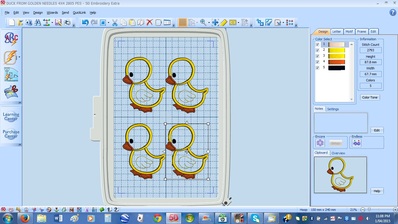
So in the picture below I put one duck on first, right clicked my mouse and copied the design and then pasted it 3 times and just manually moved it to fit within the frame. This frame is 240mm x 150mm
So in the picture below I put one duck on first, right clicked my mouse and copied the design and then pasted it 3 times and just manually moved it to fit within the frame. This frame is 240mm x 150mm
1 comment
Thank you. That is a cute image you have there too.

140723✽
You should be able to do it on the edit screen of your machine. Just load the design twice and move them to separate. I'm not sure though if the 350E has the ability to sort the colours of if you have to stitch through each design separately. Someone who knows will be along soon!
2 comments
Thanks I wasn't aware colours could be sorted. Not something I have really thought about until now. I am learning so much the more I do
That is the best way to learn!
7806✽
Well you can do it both ways Sewmum1....either on the machine's edit screen or using any software like myeditor which is free!
I think its pretty simple to do it in the machine itself as you can see exactly how many will fit perfectly in the maximum sewing field of the 5×7 hoop and you can easily rotate the design to fit in as many as possible!
I think its pretty simple to do it in the machine itself as you can see exactly how many will fit perfectly in the maximum sewing field of the 5×7 hoop and you can easily rotate the design to fit in as many as possible!
7806✽
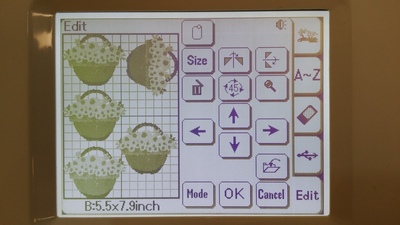
Heres an example using an inbuilt design....I managed to fit in 5 in the 5×7 hoop.....it doesnt have option for colour sorting!
What you can do is put 1 colour of thread ...using the jump option finish all parts of that colour...then change thread to second colour and do the same so you dont have to change threads so many time for each piece of design!
I hope its clear for you :)
What you can do is put 1 colour of thread ...using the jump option finish all parts of that colour...then change thread to second colour and do the same so you dont have to change threads so many time for each piece of design!
I hope its clear for you :)
1 comment
Ahhh I see now. Looks easy enough. The design I have is very simple so only a couple of colour changes. Thank you for taking the time to take photos.
7806✽
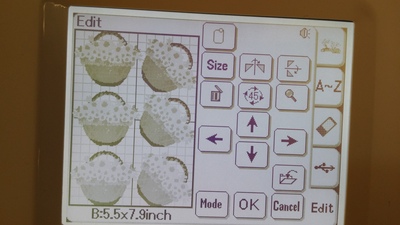
Actually managed 6 now...LOL :)
I feel doing it on the machine is better or at least easier. ....good luck!
I feel doing it on the machine is better or at least easier. ....good luck!
1 comment
Well done. I am going to go and play now! Thanks
1217✽
Edit as tfk says but stitch each design seperately if there are a few colours as the registration may be out if you forward & back with the colours. The fabric will pull slightly in the hoop.
1 comment
Good idea, I wouldn't have thought of that. I will add that to my tips notebook. Thanks
318615✽
by
dragonflyer
01 Apr 2015
+2✽
Well, I see you have your answer...it would be easier to stitch out if you combined the designs in your software..then you could sort the colors to minimize your thread changes...
4 comments
I will give that a go too as I really need to practice using digitizer more. Was just concerned I would end up creating a mess of jump stitches again! Well with this project it won't matter so much. Thanks so much
Well, you can't really help that part...it will finish color 1 in the first design, then jump to the next and sew color 1...and so on...but it will save you changing out the thread colors...if you have 4 designs, you will only have to sew each color stop once as opposed to sewing each color stop 4 times...
Hi, Sweetie. If you're in a big hurry and don't want to fool around with the digitizer, you can still save time on thread changes in the Janome, For example, if you have three color stops, stitch out 1, then advance machine to stop 4, change thread, then 5, then back "around" to stop 2,change thread then stitch 3, then 6! Love my Janome!
graceandham thats what exactly i meant when i said 'using the jump option' :) good that you explained it!
But according to auntydee ....it will cause a problem!
Would it really??!!
But according to auntydee ....it will cause a problem!
Would it really??!!
13243✽
Thank you all so much. I will try both ways and see which is easier for me. I am still trying to figure out digitizer so I was hoping this would be something I could do quickly on my machine.