








113936✽
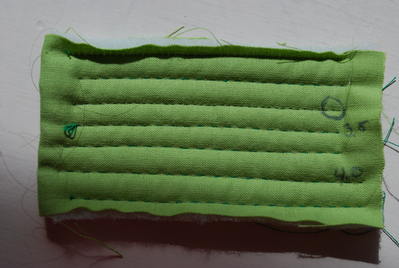
Yellow runner, thought of eastern but too late finished. Not log cabin. All sides same size. First stripe leave a tale only sew it on place halfways and in the end sew the missing stitches. Machinequilted. Have a Topaz 30, which I programmed to "handquilted stitches"However not perfect, don´t know how to change threadtension when I programme. Upper thread invisible and under a coloured thread
4 images:
[1]

[2]

[3]

[4]

Comments (15)

234573✽

78119✽
Great job, Anita! Thank you for the instructions on the hand-look Quilt stitch. I am not a quilter but I have a Topaz 30, it may be handy in the future.
Hugs, Lidia
Hugs, Lidia

145307✽
Nice table runner!
Thanks for that picture of the Husqvarna instruction sheet as that gives a couple of alternatives for the built-in quilt stitch.
Once you have programmed a stitch and use it, you adjust the tension the normal way by increasing or decreasing with the + or - buttons on the touch screen of your machine - at least that's how it was done on my old Designer1 and is on the simple Iris and the Ruby.
When you save the design to your My Stitches folder of the machine after you have changed and adjusted the setting in the sewing mode then the tension is saved as well. Don't save it directly in the programme mode as you can't change the tension setting and it is saved with the default 4.6 - which you would have to alter every time you used it.
I just tried it out and played a bit. I tried out the number 1 and 2 stitches of the instruction leaflet and those were far better than the built-in stitch in my Ruby (the one with the circle). However, I found a 4 times stitch length 0.5 followed by one SL 4.0 was what I preferred.
Thanks for that picture of the Husqvarna instruction sheet as that gives a couple of alternatives for the built-in quilt stitch.
Once you have programmed a stitch and use it, you adjust the tension the normal way by increasing or decreasing with the + or - buttons on the touch screen of your machine - at least that's how it was done on my old Designer1 and is on the simple Iris and the Ruby.
When you save the design to your My Stitches folder of the machine after you have changed and adjusted the setting in the sewing mode then the tension is saved as well. Don't save it directly in the programme mode as you can't change the tension setting and it is saved with the default 4.6 - which you would have to alter every time you used it.
I just tried it out and played a bit. I tried out the number 1 and 2 stitches of the instruction leaflet and those were far better than the built-in stitch in my Ruby (the one with the circle). However, I found a 4 times stitch length 0.5 followed by one SL 4.0 was what I preferred.
3 comments
Thank you very much for your help. Like you i prefer the 4 length stitch. Thank you once again
i am quilting mine at #5 love your sample thank-you!!!hugs all
Thanks for the photos! It really helped a lot.

86901✽
by
highlandermom
13 Apr 2015
+6✽
Very nice table runner. Cheerful colors.
Thanks for sharing. This is one I want to work with in my machine as well.
Thanks for sharing. This is one I want to work with in my machine as well.

169064✽
It's bright beautiful and cheery. Perfect picture for our 4th rainy day.
1407✽
318619✽

360672✽

261163✽
33641✽
I like the "hand stitching" look! Your quilting lines are so straight. Mine always end up wavy. Nicely done!
1 comment
I use a Hera and a ruler. Easy to follow the straight line
66028✽

145791✽
6951✽
Such a lovely table runner you've made. You might try looking in the book for more info on your machine tension adjustments. Thanks for sharing your work.

109894✽
Thanks anitapatch, I just dl the info from Community post. Your runner looks very 'hand stitched'. I need to,and having been wanting to, make me one. Maybe I will use this technique. Thank you for all your links, they have been most helpful to me.-Toogi
23577✽